
Preschool Enrolment and Billing Management for Your Centre
A mid-month start does not have to mean a confusing invoice. To manage preschool enrolments and billing, use the child’s agreed start date and schedule to calculate any prorated amount, then apply your written policy consistently. Attendance can also inform charges where your policy makes it relevant.
A small schedule change can create extra admin: a new start date, an added day or a family changing its usual hours. Clear rules help everyone understand what an invoice covers and why the amount has changed.
This guide explains how enrolment and attendance records can support invoicing, payment plans and partial payments. It also covers supplementary charges, prorated billing when schedules change, and practical steps for carrying each update into the next invoice. The aim is straightforward: clearer records, fewer billing surprises and more time for the people in your centre.
Key Takeaways
- Keep each child’s enrolment details and attendance record aligned so invoice changes have a clear basis.
- Set out due dates, late-payment steps and accepted payment methods in a clear policy, then apply it consistently.
- Separate recurring charges from one-off extras, and explain the billing policy during enrolment.
- Use a consistent method to adjust charges when a child starts mid-month or changes their regular schedule.
Table of Contents
Automated invoicing based on enrolment and attendance
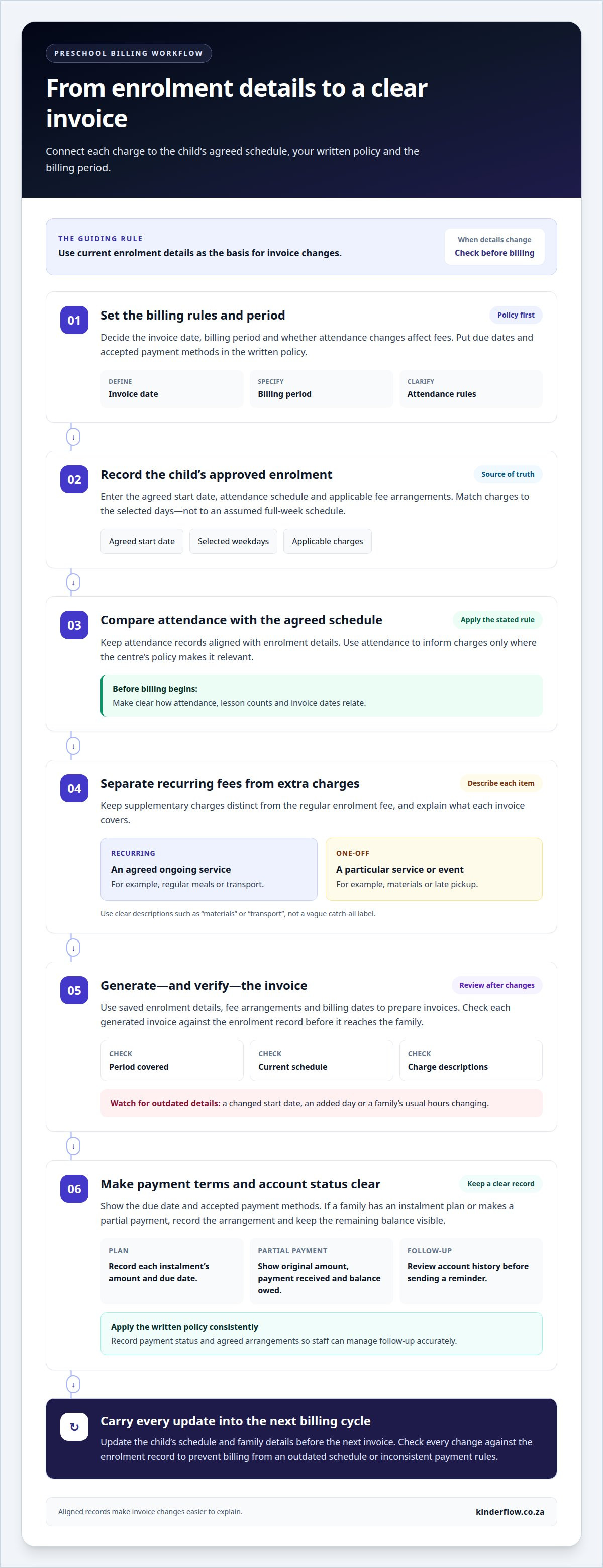
Link each invoice to the child’s agreed enrolment schedule and recorded attendance. Set clear billing rules first, then apply them consistently when schedules change.
Invoice Dates and Lesson Counts
Set the invoice date and billing period in your centre’s payment policy, then match each child’s schedule to that period. For example, base charges for a child attending on selected weekdays on the agreed days, not an assumed full-week schedule. Decide before billing begins whether attendance changes affect fees. This helps families understand how attendance, lesson counts and invoice dates relate.
Automated Invoice Generation
Automated invoice generation uses saved enrolment details, fee arrangements and billing dates to prepare invoices. Start by entering each child’s approved schedule and applicable charges. Then compare each generated invoice with the enrolment record, especially after a start date or schedule change. This review helps catch outdated details before an invoice reaches a family.
Monthly Billing
For automatic monthly billing, set a recurring billing date and link it to each child’s current enrolment terms. The invoice should show the period covered and explain any schedule-based adjustment. For example, a newly added attendance day should be charged according to the centre’s stated policy. Make payment due dates and accepted methods clear so families know what to expect each month.
South African centres should organise enrolment, attendance, invoice and payment records for tax reporting, while handling personal information carefully under applicable privacy requirements. Use access controls and collect only the details needed for centre administration.
Preschool fees vary by location, age group, attendance schedule and included services. Set fees according to your centre’s costs, then explain what each invoice covers rather than relying on a broad regional estimate.
Manage applications by recording each enquiry, tracking waitlist status and sending enrolment forms when a place is offered. For re-enrolments, update the child’s schedule and family details before the next billing cycle.
Enrolment forms commonly collect child and caregiver details, emergency contacts, medical information and the chosen attendance schedule. Request supporting documents only when they serve a clear enrolment or care purpose.
Before moving records into a new system, organise current enrolment, attendance, invoice and payment data. Import the records, then compare sample entries with the original files before preparing the next invoices.
Common mistakes include billing from an outdated schedule, overlooking a changed start date and applying payment rules inconsistently. Before generating invoices, check every change against the enrolment record.
Recurring auto-pay, instalments, and partial payments
Payment plans work best when families can clearly see the amount, timing and method. Put each arrangement in writing before the first tuition payment is due.
Recurring Payments and Instalments
Automatic monthly billing gives families a regular payment date and can help reduce late payments. An instalment plan divides tuition into agreed payments over a stated period. Record each instalment’s amount and due date, and explain how the plan fits the normal billing cycle. For example, specify whether an instalment replaces or supplements the usual monthly charge.
Set out accepted payment methods in the same policy. Card payments and bank transfers are methods a centre may choose to accept. Specify which methods apply to recurring payments and what families should include as a payment reference, such as the child’s name.
Partial Payments and Due Dates
Allowing a partial payment can help a family pay an invoice in stages, but the remaining balance needs a clear due date. Show the original amount, payment received and balance still owed on the account. Explain late-payment consequences in plain language, including the steps the centre will take under its policy. Families should understand these terms before agreeing to a plan.
Paperless billing can make invoices and payment records easier to share and store. Send each digital invoice to the agreed family contact and record its payment status on the account. A clear account history helps staff distinguish a partial payment from a missed payment.
Payment Policy Enforcement
Apply the same written payment policy consistently across families. If the policy sets a due date, late-payment consequence and accepted methods, follow those terms in each case. Record any agreed instalment or payment arrangement so staff can manage follow-up accurately. Consistency reduces avoidable disputes and supports respectful relationships with families.
Include the policy in the enrolment process and family handbook. Ask families to acknowledge that they understand it, then give them a copy for their records. Before sending a reminder, review the account history, especially if a family has made a partial payment or agreed to instalments.
Supplementary charges for meals, transport, materials, and late pickup
Keep supplementary charges separate from the regular enrolment fee. A recurring meal or transport charge can appear on a recurring invoice, while a one-off materials fee or late-pickup charge can be billed separately. This helps families distinguish standard tuition from charges for a particular service or event.
Define each charge before adding it to an invoice. For meals, record whether the charge applies regularly or only when a family requests a meal. For transport, link the charge to the agreed arrangement. For late pickup, explain what triggers a charge and how it will be recorded. Use clear invoice descriptions, such as “materials” or “transport”, instead of a vague catch-all label.
- Recurring charge: Apply it to an agreed ongoing service, such as regular meals.
- One-time charge: Use it for a single event, supply request or applicable late pickup.
- Invoice description: Name the item and period or event it relates to.
Include the billing policy in enrolment materials and the family handbook. Explain which supplementary charges may apply, how they are calculated, when they appear and how families can query an item. During enrolment, ask families to acknowledge that they understand the policy. Apply the same stated criteria to each family and record the reason for every charge.
Materials and supplies also need clear records. Keep an inventory showing what the centre holds, what has been issued and which items need replenishing. If a supply is charged to a family, link the charge to the relevant item or request. This helps staff distinguish centre stock from family-specific purchases and reduces confusion when preparing invoices.
Review supplementary items alongside the child’s enrolment details before billing. Set up recurring invoices for ongoing services and one-off billing for separate charges. Clear item descriptions, recorded reasons and a policy shared at enrolment help families understand each line.
Prorated billing for mid-month enrolments and schedule changes
A mid-month start changes the first billing period, but not necessarily the monthly fee. Set a written proration method before enrolment begins. Base the adjustment on the agreed start date and the centre’s billing unit, such as scheduled days or sessions. Apply the same method whenever a child joins or changes their regular schedule.
For a clear calculation, identify the monthly charge and the days or sessions it covers. Then count the billable days or sessions from the effective start date to the end of the period. Divide the monthly charge by the full period’s billable units, then multiply by the units included for that child. Apply the centre’s stated approach consistently, including to closures or non-attendance where the policy applies.
When a schedule changes, record its effective date and the revised attendance pattern. Decide whether to adjust the current invoice or apply the new amount from the next monthly cycle. For example, if a family adds a regular attendance day, reflect the new schedule from its agreed effective date. A dated change record makes the adjustment easier to explain later.
- Mid-period start: Calculate from the agreed start date through the billing period’s end.
- Fewer scheduled days: Use the revised pattern from its effective date.
- Temporary absence: Follow the written policy rather than assuming an automatic credit.
Show the original monthly charge, adjustment period, calculation basis and prorated amount as separate invoice details. This helps families understand how the figure was reached instead of seeing an unexplained change. Keep the enrolment record, schedule update and invoice aligned so staff can trace each adjustment to its source.
Use one method across enrolments and schedule changes, and explain it during enrolment. To keep schedule updates connected with billing records, explore connected enrolment and billing management.
Kinderflow: Kinderflow ECD Centre Management Software
Kinderflow ECD Centre Management Software brings key preschool administration together in one platform. Its tools include online enrolments, attendance tracking and automated billing and invoicing. By keeping enrolment and attendance records close to billing tasks, Kinderflow helps centre teams manage schedule changes with a clearer view of the related information.
Kinderflow can support South African preschools, creches and daycares looking to organise administrative tasks and everyday information. Alongside enrolment, attendance and billing, the platform includes learning milestone records and multi-centre administrative overviews. It supports centre administration, not childcare provision.
If you’d like to explore how Kinderflow could support your centre’s enrolment and billing processes, contact Kinderflow.
Make room for a calmer admin routine
A clearer billing process starts with a practical decision: how will a change move from a family conversation into the centre’s records? Agree on who records updates, when they take effect and how staff communicate them. A shared routine helps prevent small schedule adjustments from becoming confusing account questions.
As your centre grows, review whether your current tools still support the way your team works. A system that brings administration together can help staff spend less time piecing records together and more time with children and families. Identify the daily tasks you want to make easier, then consider how one connected platform could support them.
Kinderflow offers Kinderflow ECD Centre Management Software for South African ECD centres. If you’re ready to explore a more connected way to manage preschool enrolments and billing, contact Kinderflow to discuss your centre’s needs. Take it one step at a time, and build a routine that feels clear for your team and families.
Frequently Asked Questions
What software can manage preschool enrolments and billing in South Africa?
Kinderflow ECD Centre Management Software supports preschool administration with online applications, enrolment records, attendance tracking, billing and invoicing. Its enrolment pipeline tracks families from enquiry to enrolment, while class placement uses live capacity information. Administrators can review available class space alongside a child’s application, then keep the child’s centre records together as enrolment progresses.
How can preschool fees, deposits, discounts, and payment plans be set up?
Set out each term in a written fee policy and record the agreed arrangement against the family’s account. For example, distinguish a one-off deposit from regular tuition, and note whether a discount applies to a specific child or circumstance. Make the amount, timing, conditions and any instalment dates clear in the enrolment agreement. This gives staff a consistent reference when updating an account or answering a family’s billing question.
Which payment methods and recurring billing options work for South African preschools?
Centres can use EFT or debit orders for family payments, with recurring monthly billing for regular fees where that suits their policy. State the accepted method and payment reference in enrolment information, such as the child’s name or account reference. Kinderflow’s finance and billing tools support EFT and debit-order payments. Card payments are not listed among these centre payment methods, so avoid presenting them as an available option.
How should preschools manage invoices, receipts, overdue accounts, and payment reminders?
Keep an account trail connecting each invoice with its payment and any follow-up. Record payment dates and references, retain receipts and update the balance so staff can distinguish an outstanding amount from a recent transfer. Use an overdue account view to prioritise follow-up, then send a reminder that identifies the invoice and balance. Parent statements help families review charges and payments together.
What South African tax, POPIA, and record-keeping rules apply to preschool enrolment and billing?
Keep enrolment, attendance, invoice and payment records organised for tax reporting. Handle personal information carefully under applicable privacy requirements, use access controls and collect only the details needed for centre administration.

Frequently asked questions
What software can manage preschool enrolments and billing in South Africa?
Kinderflow ECD Centre Management Software supports preschool administration with online applications, enrolment records, attendance tracking, billing and invoicing. Its enrolment pipeline tracks families from enquiry to enrolment, while class placement uses live capacity information. Administrators can review available class space alongside a child’s application, then keep the child’s centre records together as enrolment progresses.
How can preschool fees, deposits, discounts, and payment plans be set up?
Set out each term in a written fee policy and record the agreed arrangement against the family’s account. For example, distinguish a one-off deposit from regular tuition, and note whether a discount applies to a specific child or circumstance. Make the amount, timing, conditions and any instalment dates clear in the enrolment agreement. This gives staff a consistent reference when updating an account or answering a family’s billing question.
Which payment methods and recurring billing options work for South African preschools?
Centres can use EFT or debit orders for family payments, with recurring monthly billing for regular fees where that suits their policy. State the accepted method and payment reference in enrolment information, such as the child’s name or account reference. Kinderflow’s finance and billing tools support EFT and debit-order payments. Card payments are not listed among these centre payment methods, so avoid presenting them as an available option.
How should preschools manage invoices, receipts, overdue accounts, and payment reminders?
Keep an account trail connecting each invoice with its payment and any follow-up. Record payment dates and references, retain receipts and update the balance so staff can distinguish an outstanding amount from a recent transfer. Use an overdue account view to prioritise follow-up, then send a reminder that identifies the invoice and balance. Parent statements help families review charges and payments together.
What South African tax, POPIA, and record-keeping rules apply to preschool enrolment and billing?
Keep enrolment, attendance, invoice and payment records organised for tax reporting. Handle personal information carefully under applicable privacy requirements, use access controls and collect only the details needed for centre administration.