
Preschool Billing Errors Prevention: Check Ages, Fees and Billing Records

Most preschool billing errors begin with small mismatches: a child’s age, an updated fee or a charge entered twice. Preschool billing errors prevention starts with checking each child’s details, comparing charges with attendance and fee records, and reviewing invoices before sending them. Regular billing reviews can reveal recurring issues before they confuse families or disrupt centre finances.
Admin tasks can quickly pile up alongside the care and learning that matter most. A consistent review routine brings clarity to billing without adding unnecessary complexity. This guide covers age alerts for fee changes, duplicate-charge checks, record comparisons and practical audits. Clear, accurate records also make it easier to resolve mistakes calmly and maintain trust with families.
Key Takeaways
- Use children’s dates of birth and your centre’s fee rules to flag upcoming age-related changes before preparing invoices.
- Compare each billing run with enrolment, attendance and payment records to catch duplicate or mismatched charges.
- Correct billing mistakes promptly and communicate clearly with families to support trust and reduce time spent resolving disputes.
- Review a sample of billing records regularly, then use recurring errors to improve your checks and staff processes.
Table of Contents
1. Automated age verification and age-transition alerts
Start with each child’s date of birth and the fee schedule linked to their enrolment. Set an alert ahead of a birthday that may change the applicable class or fee. Before preparing the next invoice, compare the child’s recorded age with the centre’s written fee policy. The alert should prompt a staff member to review the change, not automatically alter a family’s charge.
South African preschools should base charges on clear enrolment terms, explain fees to families and show VAT treatment accurately where applicable. There is no universal preschool fee schedule, so keep the centre’s own terms aligned with its billing records.
Common errors include outdated fee records, duplicate charges, incorrect attendance details and missed credits. They often stem from copying information manually, entering updates late or leaving it unclear who is responsible for changing a child’s record.
Prevent errors before sending invoices by checking the child’s enrolment details, fee category, attendance arrangement, and previous balance. Billing software can flag a missing field, a changed age band, or a duplicate charge. Keep a person in the review process. AI-assisted error detection can identify unusual entries, but staff should compare each alert with the centre’s records before approving payment requests. Medical claims and medical coding errors use different rules; preschool invoices should reflect actual childcare fees and services.
When charged, list tuition, deposits, meals and extra activities on separate lines. This shows families what each amount covers and helps staff trace a disputed entry to its source.
Calculate tuition, part-time attendance, holidays and mid-month enrolments according to the written fee terms and the child’s actual start date or attendance plan. Record the calculation method so the next invoice uses the same basis.
For late payments, refunds, credits or disputed charges, record the amount, reason, decision and communication. Pause a disputed line while reviewing the agreement and payment history, then issue a corrected record if needed.
Track ECD subsidies or other funding separately from family charges. Match each funding entry to its award or payment record, and apply it only as the funding terms direct.
To correct an error, compare the invoice with enrolment and payment records, adjust the entry and send parents a clear explanation. Keep the original and corrected records together for future audits.
2. Duplicate billing prevention
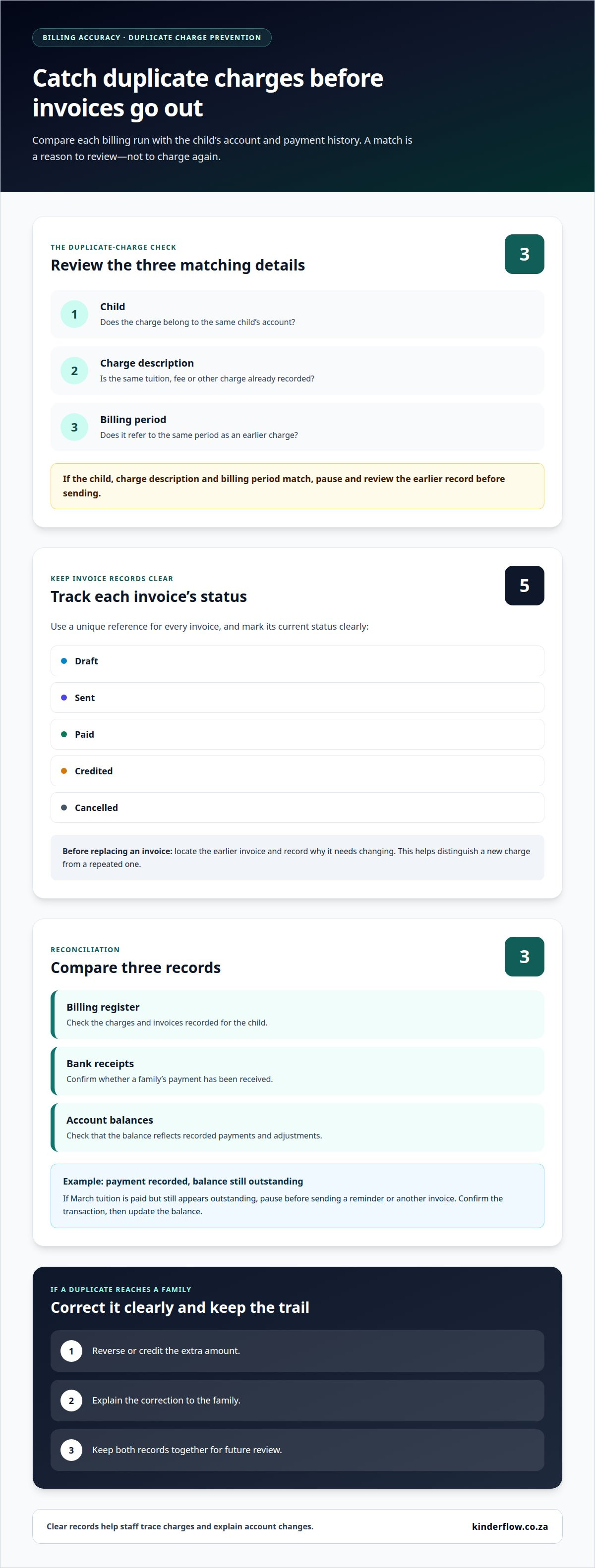
A duplicate charge can occur when a family’s payment is entered twice or copied into another billing run. It can also happen when staff create a replacement invoice without cancelling the original. Before sending an invoice, compare it with the child’s account and payment history. A matching child, charge description and billing period should trigger a review, not another charge. This is a practical first step in preschool billing errors prevention.
Maintain one clear record for each child and household. Give every invoice a unique reference and mark it as draft, sent, paid, credited or cancelled. Before preparing a replacement, locate the earlier invoice and record why it needs changing. This helps preschool teams distinguish a genuine new charge from a repeated error.
Billing software can flag duplicate invoice references or matching charges for the same child and period. Reconciliation adds another useful check: compare the billing register with bank receipts and account balances. For example, if a family has paid March tuition but the account still shows it as outstanding, pause before sending a reminder or another invoice. Confirm the transaction, then update the balance. These checks make preschool billing errors prevention part of the regular revenue cycle.
Keep the process focused on preschool fees. Medical claims, coding and reimbursement rules belong to healthcare billing, not ordinary ECD invoices. A centre’s revenue cycle runs from enrolment and fee entry through invoicing and payment. Check for repeated entries, especially when staff update records or reissue statements. If a duplicate charge reaches a family, reverse or credit the extra amount, explain the correction and retain both records. This supports clear cash flow and gives families an understandable account of what happened.
For preschool billing, use tools that connect child and family records with enrolments, attendance, invoices and payment activity. Automated checks and reconciliation can help staff spot missing information, repeated charges and balances that do not match recorded payments.
Submitting the same claim twice can delay payment and, in the worst case, raise concerns about fraudulent behavior.
3. Financial and reputational effects of billing errors
A repeated tuition charge can leave a family paying more than agreed. A missed payment entry can make a settled account appear overdue. Both errors take staff time to investigate, correct and explain. Keep the original invoice, payment record and adjustment together to show how the account reached its current balance.
Trust can suffer when an invoice includes an unexpected meal or activity charge. A parent may then question other amounts, even when they are correct. Respond with the fee agreement and the relevant attendance or activity record. If the charge is wrong, correct it promptly and explain the change plainly. A clear record makes the conversation easier for families and staff.
Errors can also affect centre cash flow. A missing payment may trigger an unnecessary reminder, while an unrecorded credit can leave an inflated balance. Compare outstanding accounts with bank receipts and approved adjustments. This helps distinguish genuinely unpaid tuition from a recording mistake before following up.
Use practical checks to spot patterns, not just individual mistakes. Compare invoice adjustments by reason, such as incorrect attendance, a missed credit or a repeated fee. If the same cause recurs, update the relevant staff step or record template. Link each change to its supporting documentation so later reviews show what was corrected and why.
Use healthcare terms carefully in a preschool setting. Healthcare practices may handle patients, coverage, claims and claim denials; ordinary ECD invoices usually concern families, agreed fees and payments. Do not describe a family balance as an insurance claim denial unless an actual payer claim is involved. Record any subsidy or funding contribution separately from the parent’s charge. This makes each revenue source easier to trace and reduces confusion during an audit.
4. Internal and third-party billing audits
Each month, compare the billing register with enrolment records, attendance, invoices, credits and bank payments. Check that every family charge has a clear reason and that recorded payments match receipts. Review unpaid balances against recent transactions before sending reminders. These checks can reveal missing entries, incorrect amounts and unexplained adjustments.
For an internal audit, sample accounts and trace each invoice from its source record to payment. For example, confirm that a meal charge matches the enrolment terms and that any credit appears on the family account. A second staff member can review adjustments and invoice changes before they are sent. This extra check can catch documentation gaps and charge errors early.
Keep the audit focused on preschool billing, not medical billing. Medical claims, coding and payer denials follow a different process. In an ECD centre, review the fee agreement, attendance record, invoice, payment receipt and any correction together. A consistent record trail makes it easier to explain how each balance was calculated.
Use audit findings to guide staff training. If reviews repeatedly find missing attendance updates, clarify who records changes and when. If credits are often missed, add a review step before closing monthly accounts. Record each mistake, its cause, the correction and the process change. This turns an individual fix into a practical prevention strategy.
A third-party audit can offer an independent view of billing records and reveal issues an internal reviewer may overlook. Share the relevant invoices, payment records, fee terms, and correction history, then use the findings to strengthen routine checks. For steadier billing records, explore tools for ECD centre administration.
In an ECD centre, periodic internal audits can reveal recurring billing errors and gaps in supporting records. Compare fees and adjustments with enrolment terms, attendance, invoices and payments. These checks show why each balance should be reconciled against the records that support it.
Billing related services separately can lead to audits and allegations of fraudulent billing, so the basis for each charge should be clear. A second-level review of claims can catch coding, documentation, modifier, and charge errors before submission to payers. For ECD teams, the practical lesson is to keep their own review within the fee agreement, attendance, and payment trail, and to refer healthcare claims to the appropriate billing process.
Kinderflow: Kinderflow ECD Centre Management Software
Kinderflow ECD Centre Management Software brings key preschool administration tasks into one system. Use automated enrolments and attendance registers to keep child records organised. Automated billing and invoicing support clearer, more consistent fee records, while learning milestone records help keep each child’s information together.
Kinderflow can help when staff are juggling enrolments, attendance, invoices and records across separate processes. Multi-centre administrative overviews also give directors a view across their centres. The software supports day-to-day administration, while staff remain responsible for reviewing billing details and resolving exceptions.
For a calmer way to manage centre records and billing workflows, visit kinderflow.co.za.
Build billing confidence into your daily routine
Accurate billing is not a one-time project. It depends on clear ownership, consistent habits and records staff can understand. Set a regular routine for reviewing changes, resolving questions and sharing updates across the team. This makes preventing preschool billing errors part of everyday administration, rather than a task that surfaces only when a family raises a concern.
Start with one practical improvement your team can maintain. Clarify responsibilities when enrolment details change, invoices are adjusted or a payment needs review. Revisit the process as your centre’s needs shift. Small, consistent steps can protect family trust and leave more room for the work that matters in the classroom.
If you’d like to discuss how to support your centre’s billing workflow, contact Kinderflow about billing. A clearer process can begin with a thoughtful conversation.
Frequently Asked Questions
Which preschool billing software features help reduce invoicing errors?
Look for billing tools that connect invoices with child and family records. Kinderflow includes monthly fees, invoices, EFT and debit-order payments, outstanding and overdue dashboards, and parent statements. These features help staff compare a family’s account with payment activity and spot an unexpected balance. A shared record can also make it easier to trace how an invoice was prepared.
What are the financial and legal risks of incorrect preschool invoices?
Incorrect invoices can delay payment, create avoidable refunds or credits, and take staff time to investigate. Repeated or unresolved disputes may also weaken families’ confidence in a centre’s records. Keep the signed fee terms, invoice, payment proof, and correction together. Clear documentation supports a fair resolution and helps the centre respond accurately if a parent questions a charge.
Frequently asked questions
Which preschool billing software features help reduce invoicing errors?
Look for billing tools that connect invoices with child and family records. Kinderflow includes monthly fees, invoices, EFT and debit-order payments, outstanding and overdue dashboards, and parent statements. These features help staff compare a family’s account with payment activity and spot an unexpected balance. A shared record can also make it easier to trace how an invoice was prepared.
What are the financial and legal risks of incorrect preschool invoices?
Incorrect invoices can delay payment, create avoidable refunds or credits, and take staff time to investigate. Repeated or unresolved disputes may also weaken families’ confidence in a centre’s records. Keep the signed fee terms, invoice, payment proof, and correction together. Clear documentation supports a fair resolution and helps the centre respond accurately if a parent questions a charge.