Preschool Attendance Tracking Software for Child Safety
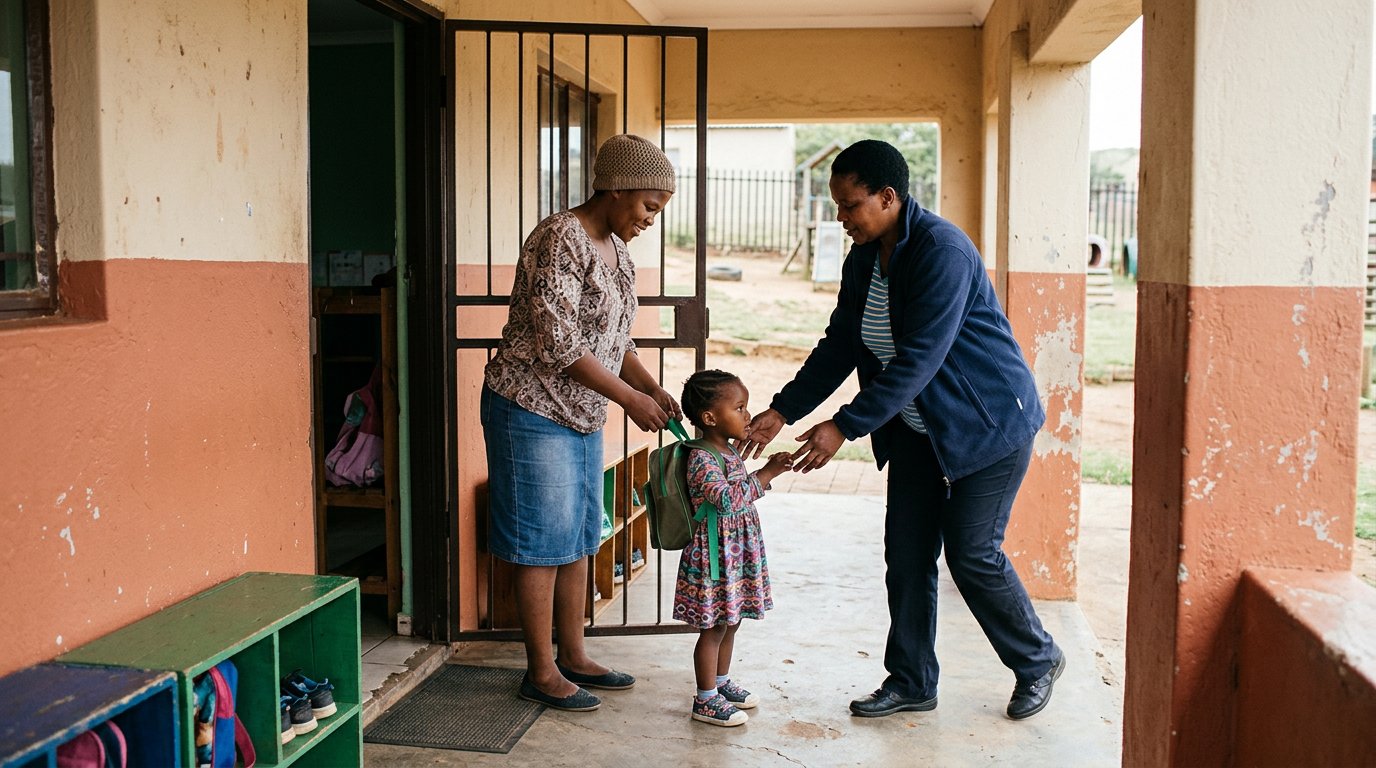
A child’s arrival and departure record should show more than a name and a time. Preschool attendance tracking software should help a centre organise attendance by programme or age group, where categories are configurable, and record who completed each check-in and check-out. This makes handovers easier to follow.
Busy arrivals leave little time to piece together paper registers, late pick-ups and changing schedules. Clear records help staff see who is present and keep families informed. This guide explains how attendance tracking works and what to consider when organising records across programmes or age groups.
You’ll learn how child and staff check-ins, arrival and departure times, parent updates and attendance records can support centre routines and billing. We’ll also cover practical features that make daily records easier to manage, from drop-off through collection.
Key Takeaways
- Use clear attendance records to support safe handovers and keep billing details organised.
- Set a consistent digital check-in and check-out routine for children and staff.
- Keep families informed with access to relevant attendance updates and notifications.
- Capture arrival and departure times carefully to make daily attendance easier to review.
Table of Contents
Attendance records for safety and billing
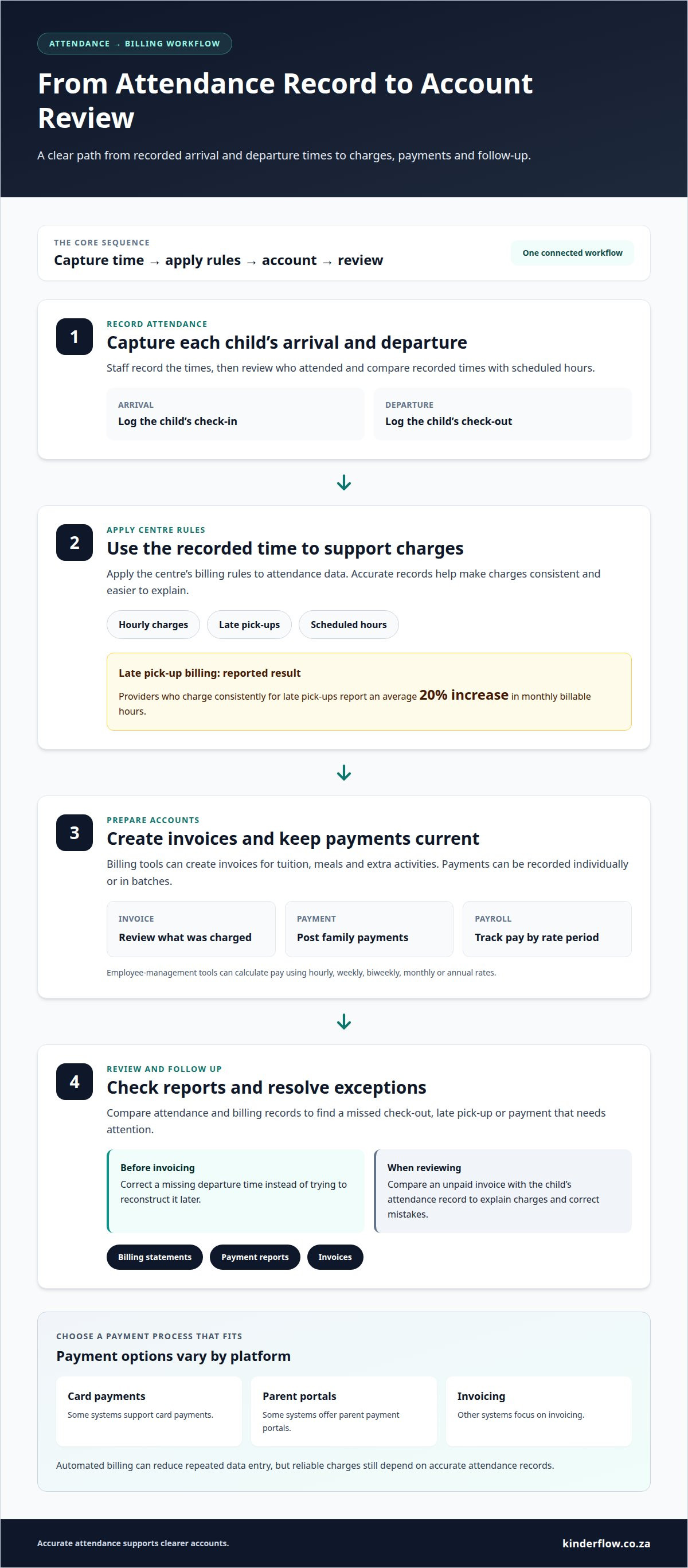
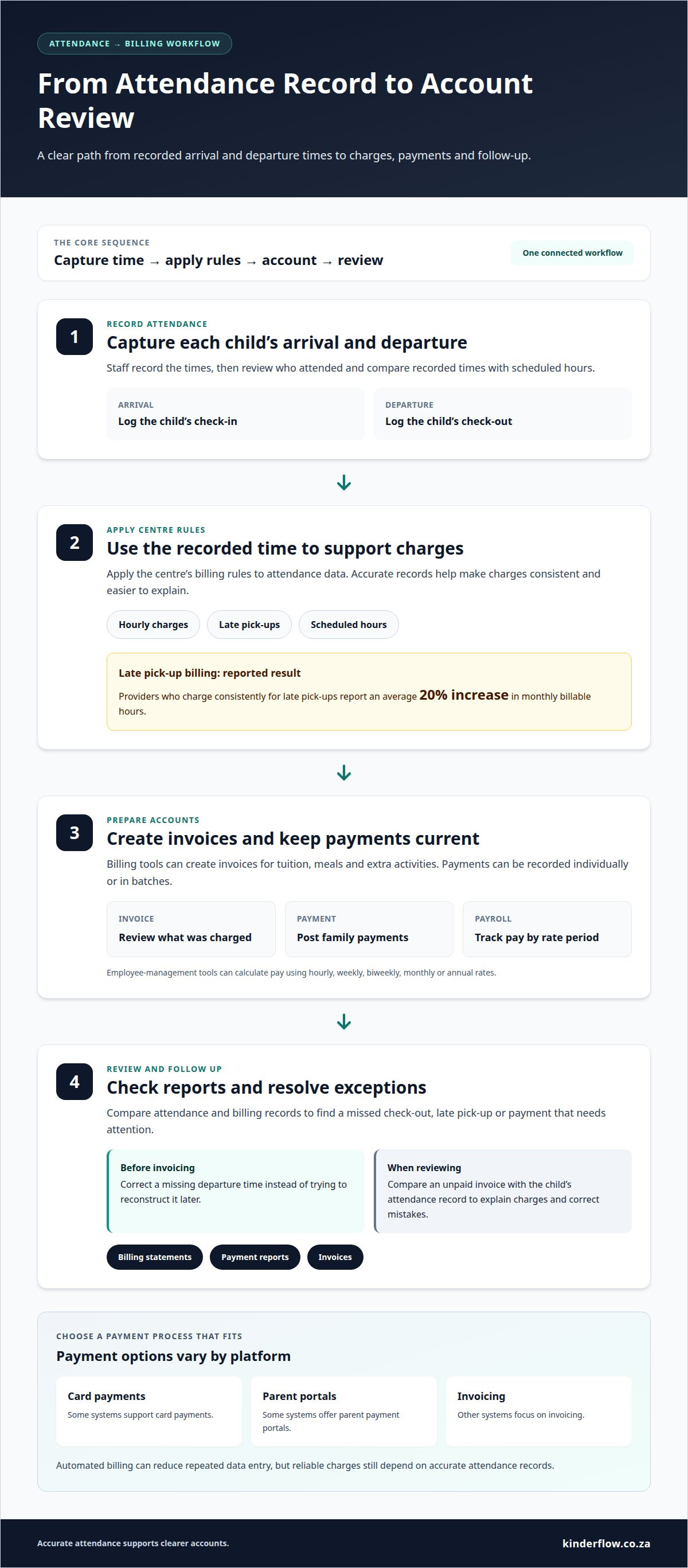
Preschool attendance tracking software can connect a child’s recorded arrival and departure with daily billing. Staff can review who attended, compare recorded times with scheduled hours, and follow up on incomplete records. For example, they can correct a missing departure time before preparing an invoice instead of trying to reconstruct it later.
Use the records as a clear path from attendance to accounts. First, capture each child’s arrival and departure. Then apply the centre’s billing rules to the recorded time. Attendance data can support hourly charges, while billing tools can create invoices for tuition, meals, and extra activities. Some systems also support billing for late pick-ups. Providers who charge consistently for late pick-ups report an average 20% increase in monthly billable hours.
- Post payments: Billing software can record payments individually or in batches, helping staff keep each family’s account current.
- Prepare reports: Generate billing statements, payment reports, and invoices to review what was charged and what was received.
- Track payroll: Employee-management tools can calculate pay using hourly, weekly, biweekly, monthly, or annual rates.
- Review exceptions: Compare attendance and billing records to find a missed check-out, late pick-up, or payment that needs attention.
Attendance and payment reports help a centre review operations in one workflow. A director can spot an unpaid invoice, then compare it with the child’s attendance record. Reviewing both helps staff explain charges and correct mistakes before they carry into the next billing run.
Payment options vary by platform. Some systems support card payments or parent payment portals, while others focus on invoicing. Choose a process that matches how families pay and staff manage accounts. Automated billing can cut repeated data entry, but reliable charges still depend on accurate attendance records.
Digital child and staff check-in and check-out
Digital check-in turns a busy handover into a recorded step. A centre can log children’s and staff members’ arrivals and departures, then review attendance by person or site. Choose a workflow that fits the entrance routine, schedules and the way families hand children to staff.
Digital Child and Staff Check-In
Staff can record a child’s arrival on a computer or sign-in kiosk. Some systems let one staff member check in or out several children together. Staff attendance records can also show arrivals, absences and working hours, helping managers compare who is present with the day’s staffing plan.
In South Africa, handle children’s attendance information with privacy in mind under POPIA. Collect only the details needed for attendance, limit staff access, store records securely, and explain to families what the centre records and why.
Childcare Attendance Tracking Capabilities
Look beyond timestamps. Attendance tools can connect records with enrolment, billing, immunisation records and meal information. Schedules may also assign children to classrooms, teachers or activities. Choose classifications that reflect your centre’s programmes or age groups, so reports match how the centre operates.
There’s no single best option for every South African preschool. A useful platform should fit your centre’s routines and bring attendance together with the records staff use each day.
Time Savings for Providers
Digital records can reduce repeated copying between registers, staff rosters and attendance reports. For example, staff can record a check-in once, then use that entry to review attendance and follow up on a missing departure. This means fewer separate records to reconcile after the morning handover.
To set up a system and migrate existing records, first organise child and staff details, schedules, and attendance classifications. Enter current records, then compare sample entries with existing registers before relying on the new workflow. Keep historical records organised for reference. For a calmer move from paper routines to a digital attendance workflow, map the daily check-in steps before staff begin using the platform.
Parent access to attendance records and notifications
Parents can use a portal to view relevant information about their child, while updates can share daily highlights, photos and progress reports. For example, a sign-in update can confirm that the centre recorded an arrival. Keep access limited to each family’s child, rather than exposing other children’s details.
Protect attendance data with encryption and role-based access. Give parents, teachers and administrators access suited to their responsibilities. Under South Africa’s POPIA, centres should handle personal information responsibly. Practical steps include limiting access and explaining what attendance details the centre collects and uses.
Paper sign-in sheets offer a familiar manual record, but entries can be harder to find across several pages. Digital records can be searched by child or date. Set a clear correction process: record the corrected time, the reason and who made the change. An audit log can preserve the original entry and correction history.
Attendance information can help managers track educator roles and shifts. Staff records may show arrivals, absences and working hours by site or across an organisation. A manager can compare the shift plan with recorded attendance, then follow up if a teacher’s hours or absence needs clarification. Keep HR information separate from parent-facing child records.
Centres can organise licensing documents and inspection logs alongside internal attendance reports, making records easier to locate during a review. Label each document by date, site and purpose. Attendance reports can help teachers connect a child’s presence with learning activities, while billing records and invoices remain available to staff handling family accounts. Set permissions before inviting parents to use the platform.
Arrival and departure attendance tracking
Arrival and departure records show when each child reaches the centre and leaves. This timeline helps staff follow the day’s handovers, not just count attendance. A useful system makes each child’s entry easy to find, so staff can review recorded times when a collection detail needs clarification.
Set a consistent routine for both ends of the day. At arrival, record the child and time; at departure, enter the collection time before closing the record. If a child attends before-school and after-school programmes, use scheduled time slots to keep each part of the day distinct. Clear steps help teachers manage busy periods without relying on memory.
- Review the day: Compare attendance records with the children expected for each programme.
- Follow up gaps: Check an entry with a missing departure time before using it in a report.
- Record transport: A printed bus run sheet can document which children were picked up or dropped off.
- Keep the trail together: Use the same child record for arrival and departure entries.
For childcare management, the value lies in a dependable sequence. Staff record a child’s arrival, update the record at departure, and review exceptions before preparing attendance reports. This streamlines administration by reducing the time spent comparing separate notes. It also gives centre operations a clearer basis for attendance-linked billing and payments.
Choose a process that suits your entrance and transport routines. A centre that records bus journeys, for example, can pair a run sheet with its attendance review. A centre running several programmes can separate scheduled sessions, so staff can see which period a child attended. Keep the process simple enough for teachers to follow during handovers.
Make arrival and departure records part of a wider, orderly centre workflow. Explore attendance and centre management software for a practical way to bring daily records together.
Kinderflow: Kinderflow ECD Centre Management Software
Kinderflow ECD Centre Management Software brings attendance tracking into the wider work of running an ECD centre. It’s a practical next step when paper registers and separate admin tasks make daily records harder to manage.
Alongside attendance registers, Kinderflow supports student enrolments, automated billing and invoicing, learning milestone records, and multi-centre administrative overviews. These tools help centre teams keep operational information organised, from enrolment through attendance and billing.
If you’re ready to bring these centre workflows together, visit kinderflow.co.za to learn about Kinderflow.
Make attendance part of a calmer daily routine
Set one clear routine for recording attendance, then make it easy for every staff member to follow. Decide who records each handover, how staff handle a missing entry and when records are reviewed. Shared habits keep the process consistent as children move between programmes and daily schedules.
Before choosing preschool attendance tracking software, map the moments that matter most at your centre. Consider how staff record arrivals, who needs access to information and how attendance connects with wider administration. The right fit should support your team’s workflow, not add steps to a busy day.
Kinderflow offers Kinderflow ECD Centre Management Software for centres looking to bring administrative workflows together. If you’re ready to discuss how attendance tracking could fit your centre, contact Kinderflow about attendance tracking. Take the next step at a pace that feels right for your team.
Frequently Asked Questions
Can I tailor presence classifications according to diverse programs or age clusters?
Yes. If the system allows custom categories, use labels that match your centre’s programmes or age groups. For example, separate attendance views for a toddler group and an after-school programme can make reports easier to interpret. Keep labels clear and consistent, so staff select the right category at check-in and managers can compare like with like.
Can parents check in multiple children at once?
Yes. Kinderflow supports sibling sign-in, so a parent can record multiple children during one handover. Keep each child’s attendance entry distinct, even when a family checks in together. Staff can then see who arrived and match each child to the correct class or programme. A quick name check before the family leaves can help prevent mix-ups.
How does contactless check-in work?
Contactless check-in can use a QR code or PIN at a sign-in kiosk instead of a shared paper register. Kinderflow supports QR-code and PIN kiosk sign-in, as well as name-search sign-in. Choose the method that fits your entrance routine, show families where to start and remind them to select the correct child before completing check-in.
What features should preschool attendance tracking software include?
Look for attendance records, enrolment tools, billing and invoicing, parent communication and clear reports. Preschool attendance tracking software should connect these tasks without making staff enter the same details repeatedly. For example, an administrator may need to move from a child’s enrolment record to attendance information, while a teacher needs access suited to daily classroom work.
Does preschool attendance software support biometric or QR-code check-in?
Kinderflow supports QR-code check-in, with PIN and name-search kiosk options as well as sibling sign-in. Biometric scanning is a separate check-in method, so don’t assume a digital attendance system includes it. Consider which process families and staff can follow easily, and choose one that fits the centre’s handover routine.
Can parents receive real-time arrival and departure notifications?
Parents can receive daily sign-in updates through Kinderflow’s parent portal. This lets families view attendance information without relying only on a message at the door. Portal updates differ from real-time alerts, so consider what notification style the centre needs. For example, families may value a clear sign-in update they can view during the day.
Frequently asked questions
Can I tailor presence classifications according to diverse programs or age clusters?
Yes. If the system allows custom categories, use labels that match your centre’s programmes or age groups. For example, separate attendance views for a toddler group and an after-school programme can make reports easier to interpret. Keep labels clear and consistent, so staff select the right category at check-in and managers can compare like with like.
Can parents check in multiple children at once?
Yes. Kinderflow supports sibling sign-in, so a parent can record multiple children during one handover. Keep each child’s attendance entry distinct, even when a family checks in together. Staff can then see who arrived and match each child to the correct class or programme. A quick name check before the family leaves can help prevent mix-ups.
How does contactless check-in work?
Contactless check-in can use a QR code or PIN at a sign-in kiosk instead of a shared paper register. Kinderflow supports QR-code and PIN kiosk sign-in, as well as name-search sign-in. Choose the method that fits your entrance routine, show families where to start and remind them to select the correct child before completing check-in.
What features should preschool attendance tracking software include?
Look for attendance records, enrolment tools, billing and invoicing, parent communication and clear reports. Preschool attendance tracking software should connect these tasks without making staff enter the same details repeatedly. For example, an administrator may need to move from a child’s enrolment record to attendance information, while a teacher needs access suited to daily classroom work.
Does preschool attendance software support biometric or QR-code check-in?
Kinderflow supports QR-code check-in, with PIN and name-search kiosk options as well as sibling sign-in. Biometric scanning is a separate check-in method, so don’t assume a digital attendance system includes it. Consider which process families and staff can follow easily, and choose one that fits the centre’s handover routine.
Can parents receive real-time arrival and departure notifications?
Parents can receive daily sign-in updates through Kinderflow’s parent portal. This lets families view attendance information without relying only on a message at the door. Portal updates differ from real-time alerts, so consider what notification style the centre needs. For example, families may value a clear sign-in update they can view during the day.