Daycare Invoicing Software for Child Care Businesses
The best daycare invoicing software does more than send bills. For South African childcare businesses, it should support parent payments, connect attendance with billing, and make income, reports and outstanding balances easier to track. Clear records help keep the financial side of care organised.
Invoicing can quickly become a string of small tasks: preparing charges, recording payments and following up on unpaid accounts. The right features bring those details into a clearer process, leaving staff more time for children and families.
Learn what to look for in parent payment options, attendance-linked charges, financial tracking and reporting. This guide also explains balance management and what to consider when choosing software for your centre. Use these practical criteria to compare features and find those that fit your daily routines.
Key Takeaways
- See how automated invoices and recurring billing can make family charges easier to manage.
- Learn how to keep discounts, subsidies, credits, refunds, and shared payments clear in your records.
- Find out which reports help you track payment activity and follow up on outstanding balances.
- Use practical criteria to compare software for South African childcare businesses and find a fit for your centre’s routines.
Table of Contents
What is child care billing software?
Childcare billing software manages invoices, payment records and family accounts in one workflow. Daycare invoicing software may also automate recurring fees, deposits, discounts and late-payment reminders, depending on the rules staff set for each family.
Automated Invoice Generation
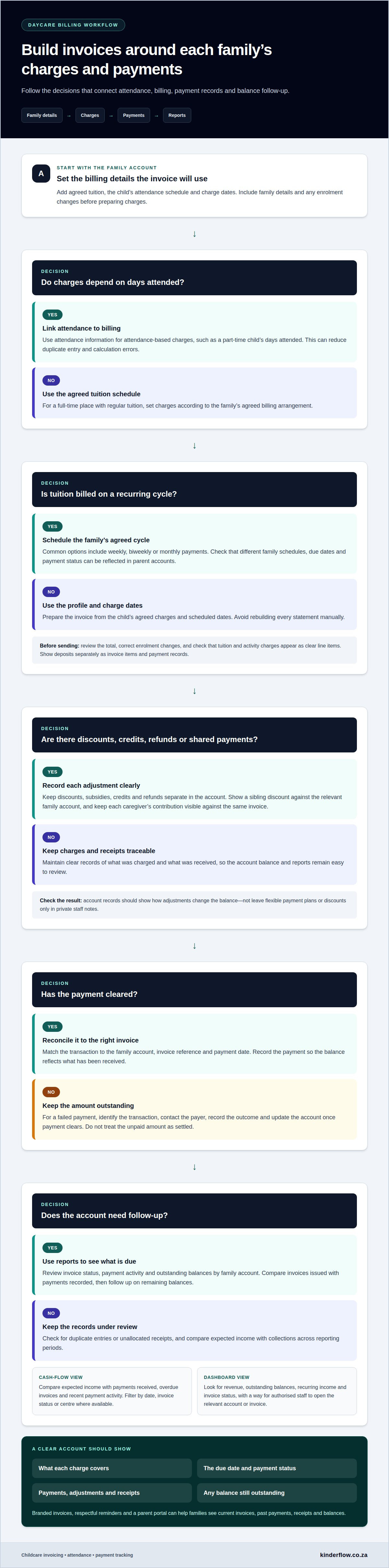
Start with each child’s profile: agreed tuition, attendance schedule and charge dates. The system can use these details to generate invoices, rather than making staff rebuild every statement manually. For example, a monthly bill can show tuition and an activity charge as separate line items. Check that staff can edit a charge, review the total and correct enrolment changes before sending the invoice. For deposits, confirm they appear as separate invoice items and payment records. These steps help reduce repeat entry and keep billing accurate.
Recurring Tuition and Flexible Billing Cycles
Recurring tuition lets a centre schedule invoices on an agreed billing cycle. Common options include weekly, biweekly or monthly payments, depending on the arrangement with each family. A part-time child might have attendance-based charges, while a full-time place follows a regular tuition schedule. Choose software that can reflect different schedules instead of forcing every family into one pattern. Check how due dates, statements and payment status appear in parent accounts. A clear billing calendar also helps families understand when to expect the next charge.
Billing Workflows for Growing Childcare Businesses
Before setup, map the process: add family details, set fees, test an invoice, then record a payment. Link attendance information to billing when charges depend on days attended. This reduces duplicate entry and calculation errors. Review how the system handles online and recurring payments, and whether staff can see unpaid accounts alongside current invoices. Clear steps make it easier for administrators to follow a consistent process across groups or centres as enrolments change.
How does daycare accounting software help with financial tracking and reporting?
A shared view of family charges, payment records and account changes makes everyday tracking easier. To reduce errors and protect payment information, review transaction records and access controls regularly.
Discounts, Credits, and Payment Adjustments
Record discounts, credits, subsidies, refunds and split payments separately. For example, apply a sibling discount to the relevant family account and show the adjusted amount on its statement. If two caregivers share a payment, keep each contribution visible against the same invoice. Before adopting a system, check how it records adjustments and updates balances. Clear entries help reports show what was charged, received, refunded or is still due.
Payment Reconciliation and Failed Payments
Reconciliation matches incoming payments to the invoices they should settle. Review each transaction against the family account, invoice reference and payment date. If a payment fails, the account should still show the unpaid amount so staff can follow up without treating it as settled. A simple process is to identify the failed transaction, contact the payer, record the outcome and update the account once payment clears. This helps prevent allocation errors.
Branded Invoices and Payment Reminders
Automated invoices can use the centre’s name and a consistent layout, helping families recognise each statement. Check that every invoice shows the child or family account, charge details, due date and payment status. Reminders sent before or after the due date can give families a clear prompt. Review their wording and timing so messages stay useful and respectful. A parent portal can also show current invoices, past payments, receipts and balances.
For families, transparency means seeing what a charge covers and how a payment changed the balance. Flexible payment plans and sibling discounts should appear clearly in account records, not only in private staff notes. Use reporting to compare invoice totals with payments received, then follow up on remaining balances. To bring enrolment and billing processes into one view, explore ECD centre management tools.
Financial reporting and outstanding balances
Useful reports bring revenue, payment activity, invoice status and unpaid balances into view. Centres can use these records to identify overdue accounts and plan follow-up.
Cash-Flow Monitoring
Cash-flow reports compare expected income with payments received. Review recurring income alongside overdue invoices and recent payment activity. If several family accounts remain unpaid, for example, the report can show the gap between billed tuition and collected payments. Check whether billing software lets you filter by date, invoice status or centre. These views make it easier to trace changes and plan routine expenses around actual receipts.
Financial Dashboards
A dashboard gathers key figures on one screen, rather than making staff open separate accounts. Look for clear totals for revenue, outstanding balances, recurring income and invoice status. Attendance and enrolment records add context: a change to a child’s schedule may affect expected charges. Choose a dashboard that lets authorised staff move from a summary to the relevant account or invoice. That connection helps teams investigate differences without searching unrelated records.
Use a regular review process to keep financial tracking useful. Compare invoices issued with payments recorded, then review the remaining balances by family account. Check for duplicate entries or unallocated receipts. Review trends across reporting periods to see whether expected income matches collections. Billing software should provide reports that support these checks, not just display a single total. Clear status labels also help staff distinguish current invoices from overdue accounts.
For practical record keeping, look for reports that can be downloaded or exported for centre administration. You may need a summary of income, unpaid invoices and payment activity for a chosen period. Keep the date range and filters visible so readers understand which figures are included. Reports organised by centre, enrolment or attendance can help explain differences between expected charges and actual income. Use the same reporting view for each review, then follow up on open balances.
What is the best daycare invoicing software in South Africa?
The best fit is software that matches your centre’s billing routines and keeps payment records clear. Compare options against real tasks: creating a family invoice, recording a payment, finding an overdue balance and preparing a report. Useful features include recurring charges, attendance-based billing, parent access and financial reporting. Together, they help staff manage daily accounts without splitting every task across different tools.
Test the same example in each system. Set up a full-time child and a part-time child, then review how each account handles scheduled tuition and attendance-related charges. Check how staff record a payment, apply a credit and view the updated balance. Also review invoice status, reminders and downloadable reports. This practical comparison shows whether the workflow is clear for administrators and families, not just whether a feature appears in a menu.
- Billing fit: Can it reflect your centre’s tuition schedules and attendance-linked charges?
- Family visibility: Can parents view invoices, receipts, payment history, and balances?
- Reporting: Can staff review revenue, payment activity, and overdue accounts?
- Data handling: Are access permissions and payment records managed clearly?
Consider how information moves into your existing accounts process. Childcare billing data may sync with QuickBooks, Zoho, or Sage, which can reduce duplicate entry when your centre uses those tools. Review the records included in any transfer, such as invoice status and payment activity. Also assess how the software stores information and manages staff access. Clear permissions help keep family account details visible to the right people.
Choose the system that handles your real billing steps with fewer handoffs. For a South African centre seeking connected administrative workflows, explore ECD centre management tools.
Kinderflow: Kinderflow ECD Centre Management Software
Kinderflow ECD Centre Management Software brings key administrative tasks together for South African preschools, creches and daycares. It can suit centres that manage billing alongside enrolments and attendance records, especially when separate tools make daily information harder to follow.
The platform includes automated billing and invoicing, student enrolments, attendance tracking, learning milestone records and administrative overviews for multiple centres. These connected tools help centre leaders organise family and operational records in one system, while reducing the time staff spend moving between routine admin tasks.
If your centre is reviewing its invoicing process, consider how billing connects with enrolment and attendance management. Explore Kinderflow’s ECD centre management software to see how its tools can support your centre’s administrative needs.
Make your next step a practical one
Start with your centre’s daily routine. Map how a family account moves from enrolment to invoice, payment and follow-up. Note where staff repeat information or have to pause to find a balance. This will help you decide which daycare invoicing software features matter most to your team.
Keep the goal simple: give administrators a clearer process and families a straightforward view of their accounts. The right system should fit the way your centre works, rather than add another layer of admin. Bring your routine and priorities into the decision, then explore Kinderflow ECD Centre Management Software as a way to manage your centre’s administrative needs.
Contact Kinderflow to discuss your needs, and take the next step toward calmer day-to-day administration.
Frequently Asked Questions
How can I get paid faster?
To get paid faster, make the amount, due date and payment route clear before sending each invoice. Set a regular billing date, send invoices early enough for families to plan and offer convenient payment methods your centre accepts. Match incoming payments to family names and invoice references promptly. If an account remains unpaid, send a courteous reminder stating the amount due and the next step.
How can accounting software for daycare improve billing and invoicing processes?
Accounting software can improve billing by connecting enrolment details, charges, invoices and receipts to each family account. For example, when a child changes from part-time to full-time attendance, staff can update the account before the next billing run. This reduces copying between spreadsheets and statements. Review unusual changes before sending invoices, then use payment records to spot and correct mismatches promptly.
What features should daycare invoicing software include?
Look for daycare invoicing software designed around childcare routines, not just general sales. Useful features include child-linked accounts, enrolment and attendance records, recurring charges, invoice and receipt history, parent access, overdue-balance views and filterable reports. Also consider role-based access and a clear record of edits. These details help administrators trace a changed charge or answer a family’s account question without searching through separate files.
How do you set up daycare billing software and migrate existing family accounts?
Before setting up billing software, prepare a clean account file. Match each child to the correct caregiver, fee arrangement, billing date and current balance. Keep previous invoices and payment references available for comparison. Start with a small test group, generate sample statements and reconcile totals against your existing records. Then move the remaining accounts and tell families where to find future invoices.

Frequently asked questions
How can I get paid faster?
To get paid faster, make the amount, due date and payment route clear before sending each invoice. Set a regular billing date, send invoices early enough for families to plan and offer convenient payment methods your centre accepts. Match incoming payments to family names and invoice references promptly. If an account remains unpaid, send a courteous reminder stating the amount due and the next step.
How can accounting software for daycare improve billing and invoicing processes?
Accounting software can improve billing by connecting enrolment details, charges, invoices and receipts to each family account. For example, when a child changes from part-time to full-time attendance, staff can update the account before the next billing run. This reduces copying between spreadsheets and statements. Review unusual changes before sending invoices, then use payment records to spot and correct mismatches promptly.
What features should daycare invoicing software include?
Look for daycare invoicing software designed around childcare routines, not just general sales. Useful features include child-linked accounts, enrolment and attendance records, recurring charges, invoice and receipt history, parent access, overdue-balance views and filterable reports. Also consider role-based access and a clear record of edits. These details help administrators trace a changed charge or answer a family’s account question without searching through separate files.
How do you set up daycare billing software and migrate existing family accounts?
Before setting up billing software, prepare a clean account file. Match each child to the correct caregiver, fee arrangement, billing date and current balance. Keep previous invoices and payment references available for comparison. Start with a small test group, generate sample statements and reconcile totals against your existing records. Then move the remaining accounts and tell families where to find future invoices.