Creche Management Software for Registration and Daily Care

The best-fit creche software isn’t necessarily the one with the longest feature list. To compare creche management software, weigh ease of use, useful digital records, parent communication and overall value for your South African centre, not price alone. The right system should make everyday tasks, from enrolment and attendance to sharing updates, clearer for staff and families.
Those daily details matter. Staff need records they can find quickly, and families want a simple picture of their child’s day. This guide compares tools for enrolment, digital records, parent updates, daily reports, photos and attendance. You’ll see which features support your centre’s routines, how to assess ease of use, and how to judge practical value. The goal is clear administration that leaves more room for the care at the heart of the day.
Key Takeaways
- Look beyond the headline price: compare what each option includes, how fees are structured, and whether the tools fit your centre’s daily needs.
- Consider how registration and digital records can bring enrolment details and child information together, making everyday administration easier to manage.
- Assess how parent updates, daily reports and photos fit into your communication routine and help families stay connected to their child’s day.
- Check that attendance and check-in/check-out records are clear and easy to use, then explore whether Kinderflow ECD Centre Management Software suits your centre’s administration needs.
Table of Contents
How do I find the best child care and daycare software program for my needs?
Start with your centre’s daily priorities, then compare creche management software for usability, records, reporting and value. The right fit should support your real routines, from enrolment and invoicing to parent communication and child progress.
Pricing and Published Price Transparency
Price transparency means understanding how childcare software is charged and what each option includes. A low starting price may not show the full cost. Subscriptions are often based on enrolment or the number of children and classrooms. Compare these measures with your centre’s size and expected growth. Before judging value, review the complete cost breakdown, including fees, support, user access and contract obligations.
Comparing Childcare and Preschool Platforms
Compare each platform’s tools with the work your centre actually does. Creches, preschools and daycares may need different combinations of family records, attendance, employee information and invoicing. List the tasks staff handle each day, then assess how clearly each platform supports them. Reports should be quick to retrieve, and custom fields can help capture details your centre needs. Ease of use matters for the whole team.
Features, Integrations, and Mobile Apps
Core features are the records and communication tools that support daily childcare administration. Look for family records, attendance tracking, invoicing and clear reports, alongside parent communication and records suited to your program. South African platforms commonly offer web and mobile access, but integrations and apps vary. Compare available connections with your existing invoicing and communication routines. A demonstration can show whether staff can find key tasks without unnecessary steps.
Child Activity Tracking and Progress
Activity tracking records a child’s experiences and progress, while portfolios bring observations and assessments together over time. These records help educators share specific examples with parents, such as participation in an activity or a developing skill. Look for milestone records that are easy to update and progress reports that are easy to retrieve. Compare how each program stores observations and presents them to families, so development is visible without relying on scattered notes.
Contactless registration and digital records
Digital registration moves enrolment details from paper forms into organised records. Compare how each system supports your operations, from a family’s first application to everyday record updates.
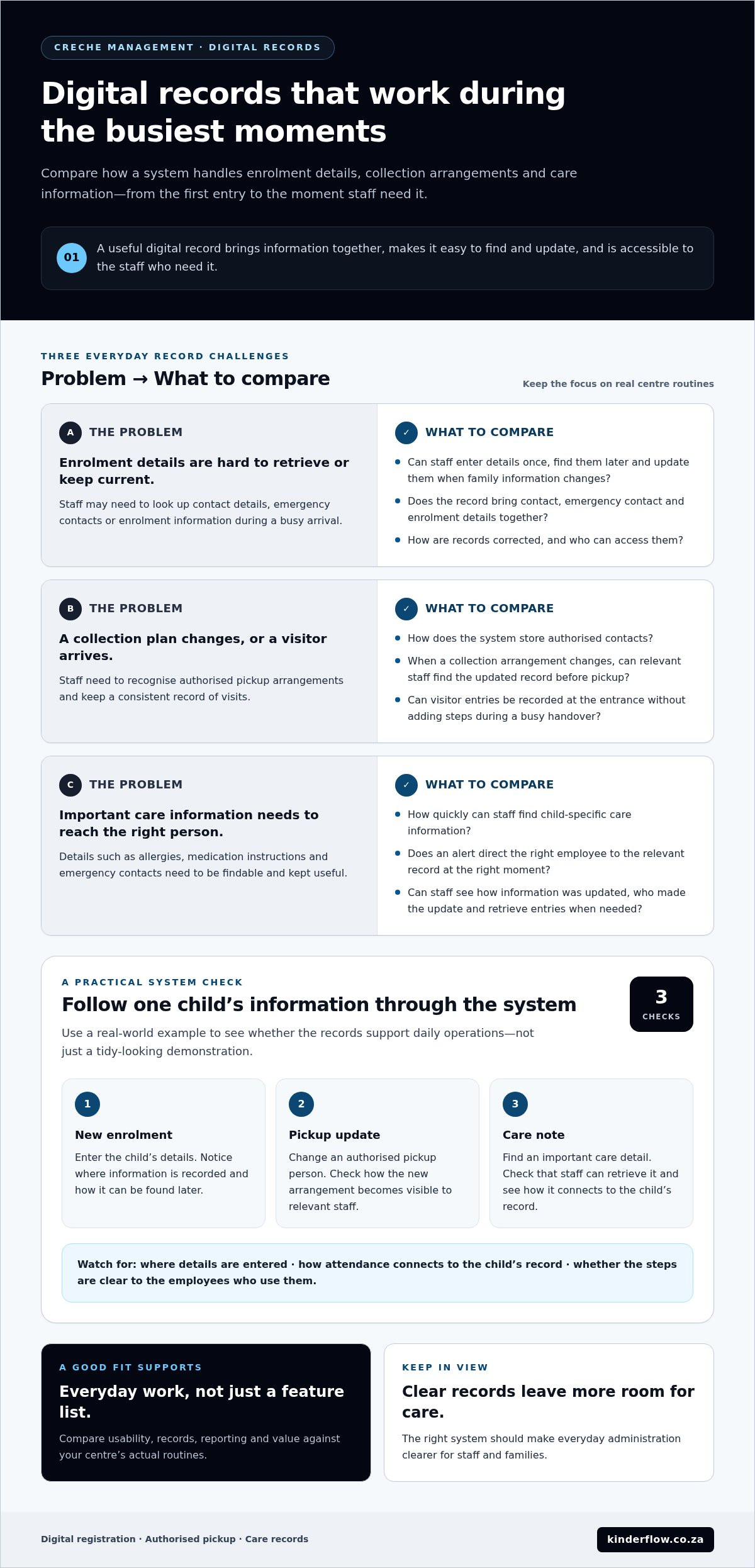
A registration record, for example, can bring a child’s contact details, emergency contacts and enrolment information together. Check whether staff can enter details once, find them later and update them when a family’s information changes. Automated enrolment can reduce repeated data entry, while a clear digital record helps staff find the right information during a busy arrival. Review how records are corrected and who can access them.
Pickup Authorisation and Visitor Records
Pickup authorisation records who may collect a child, while visitor records note who enters the centre. Both help staff recognise approved collection arrangements and keep a consistent record of visits.
Compare how each system stores authorised contacts and makes changes visible to relevant staff. If a parent updates a collection arrangement, for example, staff should be able to find the new record before pickup. Visitor entries can help the team keep track of arrivals. Consider whether the process works at the entrance without adding steps during a busy handover.
Health Records, Alerts, and Compliance
Health records organise child-specific care information, while alerts bring urgent details to staff’s attention. Clear records help early childhood teams respond consistently and maintain useful documentation.
Compare how staff find information such as allergies, medication instructions or emergency contacts. An alert is useful only if it directs the right employee to the relevant record at the right moment. Consider how the program stores updates, records who made them and retrieves entries when needed. Consistent record keeping supports centre procedures and makes it easier to review whether files are current.
Before choosing, follow one practical example through the system: a new child enrols, a family updates an authorised pickup person, and staff need to find an important care note. Notice where information is entered, how attendance connects to the child’s record, and whether the steps are clear to the employees who use them. This shows whether digital records support daily operations, not just a tidy-looking demonstration.
Parent communication, daily reports and photos
Parent communication connects what happens inside the centre with families waiting outside. Compare how each platform handles daily reports, photos and practical messages, not just how many communication tools it lists.
Daily Reports and Photos
A daily report records a child’s activities and gives parents a useful snapshot of the day. A photo can add context to a note about painting, outdoor play or a shared reading activity. Together, these updates help families feel included and give staff a clear way to share specific details.
Compare how educators create and send reports during the day. Can a staff member record a meal, rest period or activity without switching between several screens? Check whether photos appear alongside the relevant child’s report, rather than in a separate stream families must search. Clear, child-specific updates are easier for parents to follow.
Parent Messaging and Engagement
Parent messaging gives families and educators a way to exchange information about a child. A clear message about a changed pickup plan or registration detail can help the right staff respond.
Consider how messages are organised for each family and how educators distinguish an individual note from a centre-wide update. Owners may need to share a school closure notice, for example, while a teacher sends one parent a question about a child’s day. Compare how the platform keeps these conversations easy to find and connected to daily operations.
Consider how communication fits alongside payments and invoicing. A family’s account query should not get lost among activity updates or photos. During a demonstration, follow a simple sequence: prepare a daily report, attach a photo, send a message, then find the conversation again. This shows whether the program gives parents a coherent view and helps staff avoid scattered communication. The best fit supports regular engagement without requiring educators to repeat updates across separate channels.
Attendance tracking and check-in/check-out
Attendance records show when each child arrives and leaves, giving staff a clearer daily register. Compare how check-in and check-out connect with billing, invoicing and family records.
For South African payments, invoices and accounting, look for platforms that handle invoicing in rand and support the payment collection methods your centre uses. Compare how payment records, credit adjustments and accounting information fit together, as these details affect the work involved in reconciling accounts.
Creche software can bring attendance, parent communication, staff, fees and child records together, but features differ between platforms. Assess how each program connects attendance entries with child records, staff information, parent communication and fee billing.
At arrival, staff should be able to find a child’s record and mark attendance without searching through unrelated files. At departure, a clear check-out entry completes the daily record. Consider how the system handles late arrivals, early collections or missed entries. An easy-to-read register helps staff spot gaps and gives centre owners a clearer view of attendance.
Attendance can inform billing when fees depend on a child’s schedule or recorded sessions. Compare how each platform links attendance with invoices and whether staff can review the details before billing families. A centre may need to distinguish a scheduled day from an absence, for example. Clear records make invoices easier to understand and help resolve questions about payments or credits.
During a demonstration, follow one child’s journey from check-in to collection. Note whether the register is simple to update, whether a correction is visible, and how quickly staff can find the record. Then follow the same information into an invoice. This practical walkthrough reveals whether the tools support education and child care routines, or leave staff repeating entries. Explore attendance and centre administration tools as part of your comparison.
Kinderflow: Kinderflow ECD Centre Management Software
Kinderflow ECD Centre Management Software brings key centre administration tasks together. It supports automated student enrolments, attendance tracking registers, billing and invoicing, learning milestone records, and multi-centre administrative overviews. For South African creches and preschools comparing these needs, it is an option to consider alongside the features discussed above.
Consider Kinderflow when paper records, repeated data entry or separate admin tasks make centre information harder to organise. Its tools support workflows for managing enrolment, attendance, accounts and learning milestones. Explore whether Kinderflow ECD Centre Management Software fits your centre’s way of working, and contact Kinderflow to learn more.
Choose a calmer way to move forward
The right software should make daily work more manageable, not add another layer of administration. As you compare creche management software, consider the people who will use it: the team handling records, educators supporting children, and families relying on clear communication. Start by identifying the tasks that create the most friction in your centre, then assess how one system could support them.
Kinderflow offers Kinderflow ECD Centre Management Software for South African ECD centres looking to bring centre administration into a more organised flow. Explore whether it suits the way your team works and the records you need to manage. Contact Kinderflow about your needs.
Take the next step at a pace that suits your centre. Clearer systems can leave more attention for the care and connection that matter each day.
Frequently Asked Questions
How can I tell if a daycare software program is flexible and easy to use?
Test the program with familiar tasks, not just a guided tour. Ask an administrator to find a child record, update a contact detail and produce a class report, then ask an educator to do the same. Notice how many steps each task takes and whether the screens make sense without extra explanation. Check whether the tools let your centre adapt fields or reports as record-keeping needs change.
How do parents receive daily updates?
Depending on the platform, parents may receive child-specific updates through a secure login. A family could sign in to read a day’s note or view a shared photo. Check what parents can see, whether messages are tied to the right child, and how families access updates. Decide which information belongs in a private family update and which details are useful for broader announcements.
Which creche management software platforms are available in South Africa?
Kinderflow ECD Centre Management Software is one option for South African creches, preschools and daycares. It provides administrative tools for enrolment, attendance, billing, learning milestones and multi-centre overviews. New educational institutions can try the platform through its 30-day free trial. As you explore available options, consider whether the system suits your centre’s routines and the records your team needs to manage.
How do South African creche software options compare on features and ease of use?
Match each option’s tools to the work your team handles, then assess how straightforward they are to use. Check whether an owner can review centre records while an educator focuses on a child’s file. To compare creche management software, follow the same everyday task in each platform and note where information is easy to find or requires repeated entry.
How much does creche management software cost in South Africa, including setup and transaction fees?
Creche software costs vary by subscription structure and any separate charges. Subscriptions are often based on enrolment or the number of children and classrooms. The price depends on the specific requirements and is provided after a quote request. Consider whether setup, payment processing, support, additional users or updates affect the total. Review recurring and one-off charges together to understand the cost of the service you plan to use.
Does creche management software comply with POPIA and South African data protection requirements?
Software alone cannot establish that a centre’s handling of personal information meets POPIA requirements. Assess how the platform supports your centre’s data practices: who can access child and family records, how access changes when staff roles change, and how information is stored, corrected or removed. Understand how the provider and centre each handle data concerns. Clear processes and staff awareness matter alongside the software’s safeguards.
Frequently asked questions
How can I tell if a daycare software program is flexible and easy to use?
Test the program with familiar tasks, not just a guided tour. Ask an administrator to find a child record, update a contact detail and produce a class report, then ask an educator to do the same. Notice how many steps each task takes and whether the screens make sense without extra explanation. Check whether the tools let your centre adapt fields or reports as record-keeping needs change.
How do parents receive daily updates?
Depending on the platform, parents may receive child-specific updates through a secure login. A family could sign in to read a day’s note or view a shared photo. Check what parents can see, whether messages are tied to the right child, and how families access updates. Decide which information belongs in a private family update and which details are useful for broader announcements.
Which creche management software platforms are available in South Africa?
Kinderflow ECD Centre Management Software is one option for South African creches, preschools and daycares. It provides administrative tools for enrolment, attendance, billing, learning milestones and multi-centre overviews. New educational institutions can try the platform through its 30-day free trial. As you explore available options, consider whether the system suits your centre’s routines and the records your team needs to manage.
How do South African creche software options compare on features and ease of use?
Match each option’s tools to the work your team handles, then assess how straightforward they are to use. Check whether an owner can review centre records while an educator focuses on a child’s file. To compare creche management software, follow the same everyday task in each platform and note where information is easy to find or requires repeated entry.
How much does creche management software cost in South Africa, including setup and transaction fees?
Creche software costs vary by subscription structure and any separate charges. Subscriptions are often based on enrolment or the number of children and classrooms. The price depends on the specific requirements and is provided after a quote request. Consider whether setup, payment processing, support, additional users or updates affect the total. Review recurring and one-off charges together to understand the cost of the service you plan to use.
Does creche management software comply with POPIA and South African data protection requirements?
Software alone cannot establish that a centre’s handling of personal information meets POPIA requirements. Assess how the platform supports your centre’s data practices: who can access child and family records, how access changes when staff roles change, and how information is stored, corrected or removed. Understand how the provider and centre each handle data concerns. Clear processes and staff awareness matter alongside the software’s safeguards.