
Automated School Fee Billing: Payments, Reconciliation and Costs

Manual school-fee billing costs more than the time spent creating an invoice. While a manual invoice can take five minutes to process, automated school fee billing can issue charges, record cleared payments against an account and send overdue reminders. The goal is to reduce repetitive tasks and make it easier to see what families still owe.
Billing can quickly become a monthly tangle: fees arrive through different channels, payment references vary, and staff must keep records aligned while supporting families. Education payment tools can bring these steps into a more organised workflow, with scheduled payments, digital receipts and reminders helping reduce manual follow-up.
This article explains how automated billing works in South African schools and ECD centres, how payment matching and reminders fit into the process, and where manual billing creates direct and indirect costs. It also covers the factors that shape software costs, helping you weigh the administrative workload against the value of a clearer fee process.
Key Takeaways
- Plan overdue-fee reminders around clear payment policies to make follow-up more consistent for families and staff.
- Understand how payment tools can connect fee collection with student records and accounting workflows.
- Look beyond invoice preparation to see how manual tracking can also affect reconciliation and staff time.
- Compare software costs by considering the centre’s needs, payment processes and the administrative work it aims to reduce.
Table of Contents
Automated reminders for overdue fees
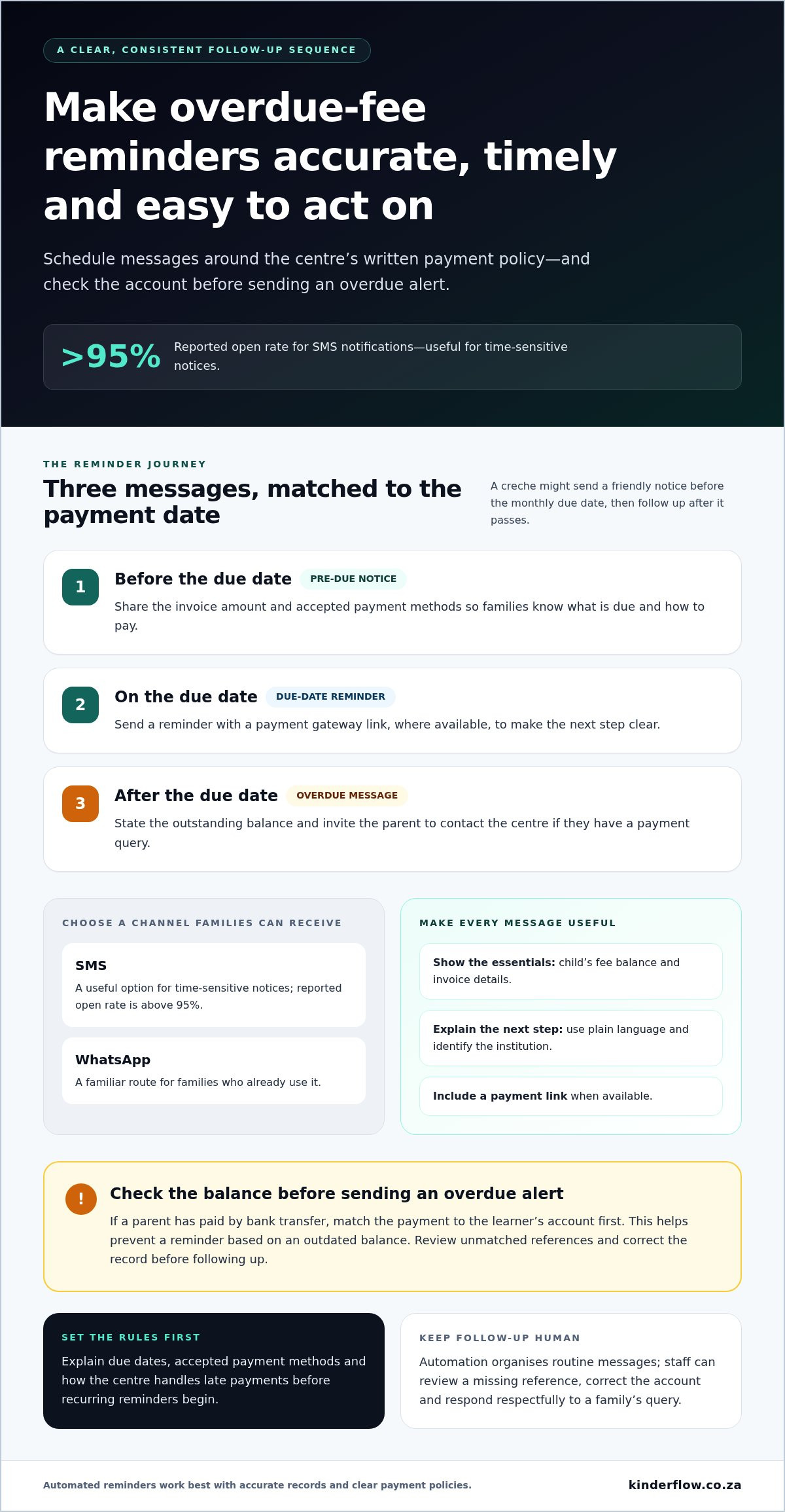
A useful reminder tells a family what remains due and how to pay. Automated systems can schedule messages around an institution’s payment dates and follow up when an invoice remains unpaid. For example, a creche might send a friendly notice before the monthly due date and another after it passes. Set the timing to match the centre’s written payment policy so families receive consistent information, not unexpected messages.
SMS and WhatsApp make reminders easier to receive on a mobile phone. Automated messages can include the child’s fee balance, invoice details and a direct payment link. SMS notifications are reported to have an open rate above 95%, making them a useful option for time-sensitive notices. WhatsApp can offer a familiar route for families who already use it. The message should identify the institution and explain the next step in plain language.
Before setting recurring reminders, map the sequence to the centre’s actual billing dates. A practical schedule could include:
- A pre-due-date notice with the invoice amount and accepted payment methods.
- A due-date reminder with a payment gateway link, where available.
- An overdue message that states the outstanding balance and invites the parent to contact the centre about a payment query.
Keep each invoice and reminder accurate. If a parent has paid by bank transfer, staff should match the payment to the learner’s account before sending another overdue alert. Linking billing records with payment information can help prevent messages based on an outdated balance. Clear payment policies matter too: explain due dates, accepted methods and how the centre handles late payments before reminders begin.
Automation supports follow-up, but it doesn’t replace a thoughtful conversation. If a family replies that a payment reference is missing, staff can review the account and correct the record. A respectful message, accurate invoice and simple payment link give parents a clearer path to settle fees, while helping administrators keep routine follow-up organised.
What Are Education Payment Solutions?
Education payment tools can connect fee collection, student details and accounting tasks. When a payment clears, it can update a learner’s balance, while the system records a receipt for the parent. Staff can then see which accounts are paid, pending or overdue without comparing separate paper lists.
Integration links billing records with a student information system and accounting software. For example, when a learner’s class or fee category changes, staff can update the student record and apply the correct billing details. A connected process can reduce duplicate data entry and errors, but staff still need to review changes and resolve mismatched records.
Parent self-service portals give families a place to view invoices, payment history and current balances. Depending on the portal, parents may also update contact details or submit an enrolment form. This can help families find essential information without waiting for an email reply. Student access should be limited to information appropriate for that learner.
For admissions, a digital form can collect a prospective student’s details before staff create an active record. During enrolment, check the child’s name, caregiver contact information and agreed fee details. Accurate starting records help prevent invoices going to the wrong person or using outdated information.
In South Africa, POPIA is relevant to how a centre handles parents’ and students’ personal information. Keep invoices, receipts and payment records accurate, access-controlled and available for applicable tax and financial recordkeeping.
Automation also has practical risks. A duplicate student profile can produce duplicate invoices, while a mistaken fee category can create an incorrect balance. Payment gateway interruptions or unmatched references can leave a cleared payment showing as pending. Assign staff to review exceptions, correct records and communicate changes to families.
For creches bringing enrolment, attendance and billing records into a shared administrative workflow, ECD centre management software can help keep those day-to-day records together.
Direct and indirect costs of manual billing
Each manually processed school-fee invoice takes an estimated five minutes. That time covers preparing or adjusting the amount, checking the learner’s details, and recording the payment. Across a term, manual fee tracking can take staff 40 to 60 hours. Spreadsheets may appear simple, but each separate update creates another chance to miss an installment or enter a payment against the wrong ledger account.
Automated school billing platforms connect fee schedules, invoices, payment gateways and account records. Accounting software records financial transactions, while a billing platform can also link charges to student details and manage recurring fees. Compared with manual invoicing, automation reduces repeated data entry. Compared with accounting software alone, it can bring learner-level billing tasks into the same workflow.
The direct cost is staff time spent creating invoices, following up on balances and matching payments. Indirect costs include delayed reconciliation, errors that need correction, and less time for family support. For a school with 600 students paying quarterly fees, automation can eliminate roughly 200 hours of administrative paperwork each year. That figure illustrates the potential scale of the task, not a guaranteed saving for every centre.
Use the five-minute mark as a practical review point. If staff take more than five minutes to produce or adjust a standard invoice, the process may involve unnecessary manual work. Track time across a billing cycle, including spreadsheet updates, mobile payment checks and unmatched gateway transactions. Then compare that workload with tasks automation could handle, such as generating invoices, updating an account after payment clears and flagging an amount still due.
For a creche, the clearest takeaway is to count the work around each invoice, not only the time spent sending it. Include payment matching, corrections and follow-up in your review. This fuller picture helps managers decide whether manual billing remains manageable or whether a connected process could give staff more time for daily centre responsibilities.
How much does school fee billing software cost in South Africa?
School fee billing software in South Africa doesn’t have one universal price. The cost depends on what a creche needs, how many learners and sites it manages, and which payment methods it uses. A centre that only prepares invoices has a different scope from one connecting enrolment, attendance, billing and account records. The price depends on the case and is given after a quote request. Key cost factors include learner numbers, centre count, selected functions, implementation needs, integrations and payment handling.
Compare quotes using the same needs. For example, list whether you need recurring invoices, overdue reminders, learner account records, payment reconciliation or reports. Then separate essential functions from optional ones. A centre managing multiple sites may need a shared view of accounts, while a smaller creche may prioritise straightforward invoicing. Clear requirements make it easier to understand what each quoted package covers.
Keep payment-processing charges separate from software charges. Card processing fees are typically calculated as a percentage plus a fixed amount per transaction. The total therefore depends on payment methods and transaction activity, not just the software subscription. Ask for a clear breakdown of software, setup, integration and payment-processing costs. This helps prevent one bundled figure from hiding which service drives the expense.
Finally, compare the ongoing cost with the work your current process requires. Include staff time spent preparing invoices, checking spreadsheets, matching payments and correcting ledger errors. Consider whether the system fits your centre’s existing accounting process and the way families pay. A lower subscription may not be the best value if key tasks remain manual. To explore how centre administration software can support billing workflows, review your ECD software needs and identify the tasks you want to bring together.
Kinderflow: Kinderflow ECD Centre Management Software
Kinderflow ECD Centre Management Software brings key administrative tasks for South African creches into one system. Its tools include online student enrolments, attendance tracking, automated billing and invoicing, learning records, and reporting for multi-centre organisations.
Consider Kinderflow when staff are juggling learner records, fee invoices and centre administration across separate processes. Bringing these tasks together can make everyday information easier to organise and give centre directors a clearer view of operations. The platform supports ECD administration; it is not a childcare service.
If you’re looking to bring fee administration and other centre records into one workflow, visit kinderflow.co.za to learn more about Kinderflow ECD Centre Management Software.
Make the next billing cycle easier to manage
Use your next billing cycle to notice where staff effort gets caught. Which handoffs need repeated checking? Where do families need clearer account information? These everyday details can help you decide what a better process should look like for your creche before changing how fees are managed.
Automated school fee billing works best when it fits how your centre communicates with families and maintains learner records. A useful next step is to map your current workflow, including who handles billing and where follow-up becomes difficult. This gives you a practical starting point for deciding whether a connected administrative system suits your team.
Kinderflow ECD Centre Management Software supports centre administration, including billing and invoicing. Contact Kinderflow to discuss billing and consider how a more joined-up process could fit your creche. Small, thoughtful changes can make room for calmer administration and more attention for families.
Frequently Asked Questions
What is the true cost of manual billing?
The true cost includes more than the time staff spend preparing invoices. Consider the knock-on work: checking disputed charges, correcting duplicate entries, tracing unclear payment references and responding to parents who need account details. These tasks can interrupt enrolment administration and family communication. To assess the full impact, track the time and corrections across a complete billing cycle, then compare them with the cost and functions of an automated process.
What is automated school fee billing and how does it work?
Automated school fee billing uses software to apply fee records to student accounts and manage routine billing tasks. For example, a centre can record a learner’s agreed fee, generate an invoice for the relevant period and show whether the account is settled. Staff still handle exceptions, such as a changed enrolment date or a disputed charge. The system organises routine steps, while staff oversee decisions and unusual cases.
What features should schools look for in automated fee billing software?
Look for learner-level accounts, adjustable fee records, clear invoice histories and reports that help staff spot discrepancies. A useful system should make it straightforward to review a parent’s account before answering a billing question. Consider whether staff can correct a charge while keeping a clear record of the change. Also assess how billing fits with enrolment and attendance administration, rather than treating fees as isolated entries.
How can a school set up automated billing and recurring payments?
Start by documenting the centre’s fee rules, including which charges apply to each learner and when they’re due. Set up student and caregiver records, enter the agreed charges and review a sample invoice for accuracy. Then explain payment dates and recurring payment arrangements to families. Test the process with staff before using it across accounts, and decide who will review exceptions and update records when enrolments change.
How do automated systems handle late payments, arrears, discounts and payment plans?
Software can apply the centre’s entered rules to account balances, but staff should define those rules clearly. For example, record an approved discount against the relevant charge and enter an agreed instalment schedule for a family’s payment plan. Keep a visible history of adjustments, payments and remaining arrears. Review unusual accounts individually, especially when a family’s agreement changes, so automated calculations don’t replace a careful, respectful conversation.
How secure are online school fee billing and payment systems?
Security depends on how a system protects account access, payment details and family records. Look for role-based access, separation between organisations and records showing who changed information. Kinderflow keeps each organisation’s children, families and staff data separate, and parent PINs are never stored in plain text. Centres should also limit staff access to the information needed for their roles and handle payment queries carefully.
Frequently asked questions
What is the true cost of manual billing?
The true cost includes more than the time staff spend preparing invoices. Consider the knock-on work: checking disputed charges, correcting duplicate entries, tracing unclear payment references and responding to parents who need account details. These tasks can interrupt enrolment administration and family communication. To assess the full impact, track the time and corrections across a complete billing cycle, then compare them with the cost and functions of an automated process.
What is automated school fee billing and how does it work?
Automated school fee billing uses software to apply fee records to student accounts and manage routine billing tasks. For example, a centre can record a learner’s agreed fee, generate an invoice for the relevant period and show whether the account is settled. Staff still handle exceptions, such as a changed enrolment date or a disputed charge. The system organises routine steps, while staff oversee decisions and unusual cases.
What features should schools look for in automated fee billing software?
Look for learner-level accounts, adjustable fee records, clear invoice histories and reports that help staff spot discrepancies. A useful system should make it straightforward to review a parent’s account before answering a billing question. Consider whether staff can correct a charge while keeping a clear record of the change. Also assess how billing fits with enrolment and attendance administration, rather than treating fees as isolated entries.
How can a school set up automated billing and recurring payments?
Start by documenting the centre’s fee rules, including which charges apply to each learner and when they’re due. Set up student and caregiver records, enter the agreed charges and review a sample invoice for accuracy. Then explain payment dates and recurring payment arrangements to families. Test the process with staff before using it across accounts, and decide who will review exceptions and update records when enrolments change.
How do automated systems handle late payments, arrears, discounts and payment plans?
Software can apply the centre’s entered rules to account balances, but staff should define those rules clearly. For example, record an approved discount against the relevant charge and enter an agreed instalment schedule for a family’s payment plan. Keep a visible history of adjustments, payments and remaining arrears. Review unusual accounts individually, especially when a family’s agreement changes, so automated calculations don’t replace a careful, respectful conversation.
How secure are online school fee billing and payment systems?
Security depends on how a system protects account access, payment details and family records. Look for role-based access, separation between organisations and records showing who changed information. Kinderflow keeps each organisation’s children, families and staff data separate, and parent PINs are never stored in plain text. Centres should also limit staff access to the information needed for their roles and handle payment queries carefully.