Automated Preschool Enrolments for Admissions and Data Entry

Yes. A preschool system can manage admissions with digital registration forms, automatic acknowledgements and family reminders. Automated preschool enrolments bring application details into one organised process, reducing time spent chasing paperwork and re-entering information. The goal isn’t to replace a personal welcome, but to make it easier to give every family clear, timely support.
Forms often arrive while staff are welcoming children, answering parents and keeping the day moving. Paperwork, messages and spreadsheets can scatter information, even when everyone is doing their best. Digital admissions can guide families from enquiry to completed enrolment, ease administrative work and help reduce avoidable data-entry mistakes. Automation is most useful when the process is clear and information is handled carefully. The result can be a smoother experience for families and more time for educators to focus on children.
Key Takeaways
- Use digital forms to gather admissions details in one place and give families a clearer path from enquiry to enrolment.
- Automate routine reminders and repeated data entry to free staff for more time with children and families.
- Manual processes can scatter information and make follow-ups harder to manage, especially during busy enrolment periods.
- Set clear, connected enrolment steps before automating them, then use centre management software to keep administration more organised.
Table of Contents
Can the system manage child enrollment and admissions?
Yes. Online forms collect applications, while preschool management software organises child records, admissions and attendance in one workflow.
Online Enrolment Forms
An online enrolment form lets families submit a child’s details digitally instead of printing or scanning paperwork. It can gather the information a centre needs to begin its admissions process, acknowledge receipt and flag missing fields for follow-up. Staff can review submitted forms in one pipeline rather than searching through emails and paper files. Automated preschool enrolments make the first step clearer for families and staff alike.
Child Profiles and Required Documents
A child profile keeps enrolment details together for day-to-day centre management. In South Africa, the information and supporting documents requested depend on each preschool’s admissions process. Forms may ask for a child’s name and date of birth, parent or guardian contact details, emergency contacts and relevant medical information. A complete profile gives staff practical details to support the child’s care and attendance routine.
POPIA treats children’s biographical details and medical information held by preschools as special personal information. Section 26 prohibits processing special personal information except under narrow conditions, while Section 34 requires documented consent from a competent person, usually a parent, for children’s data. Because this applies to children under 18 years, consent and careful access to records matter.
Admissions and System Integrations
Admissions management follows an application from submission through review and enrolment, making it easier for staff to see which forms need attention. Systems may also connect enrolment records with payment tools, centre records and messaging. For example, staff can use an application’s status to identify an outstanding form and remind the family. A clear process helps prevent missed follow-ups.
Attendance can be linked to a child’s profile, with staff recording arrival at check-in and departure at check-out. This creates a consistent daily record instead of relying on separate paper registers. Keeping admission details and attendance information together makes them easier to find, while access to children’s personal information remains controlled.
Reducing staff administrative workload
Preschool administration involves recurring records, routine updates and family communication. Automation can handle predictable tasks, giving staff more time for children and their learning.
Structured Forms and Error Reduction
Structured forms use consistent fields for details such as names, dates and fee amounts. This makes records easier to review and helps prevent errors caused by entering information in different formats.
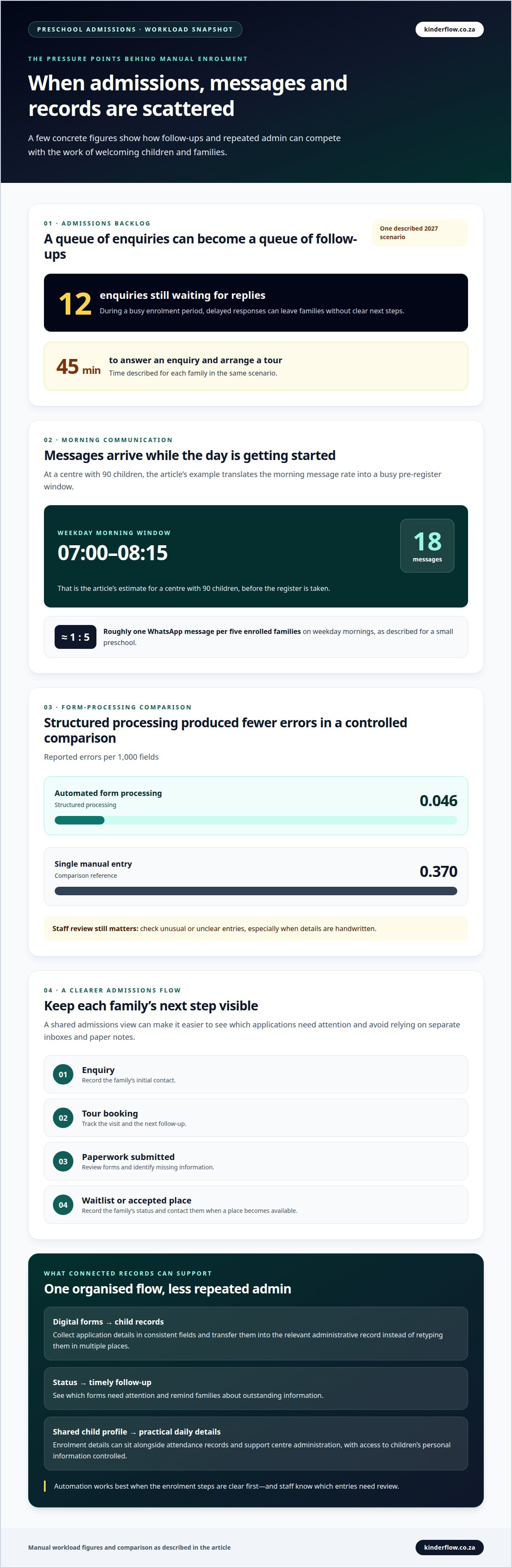
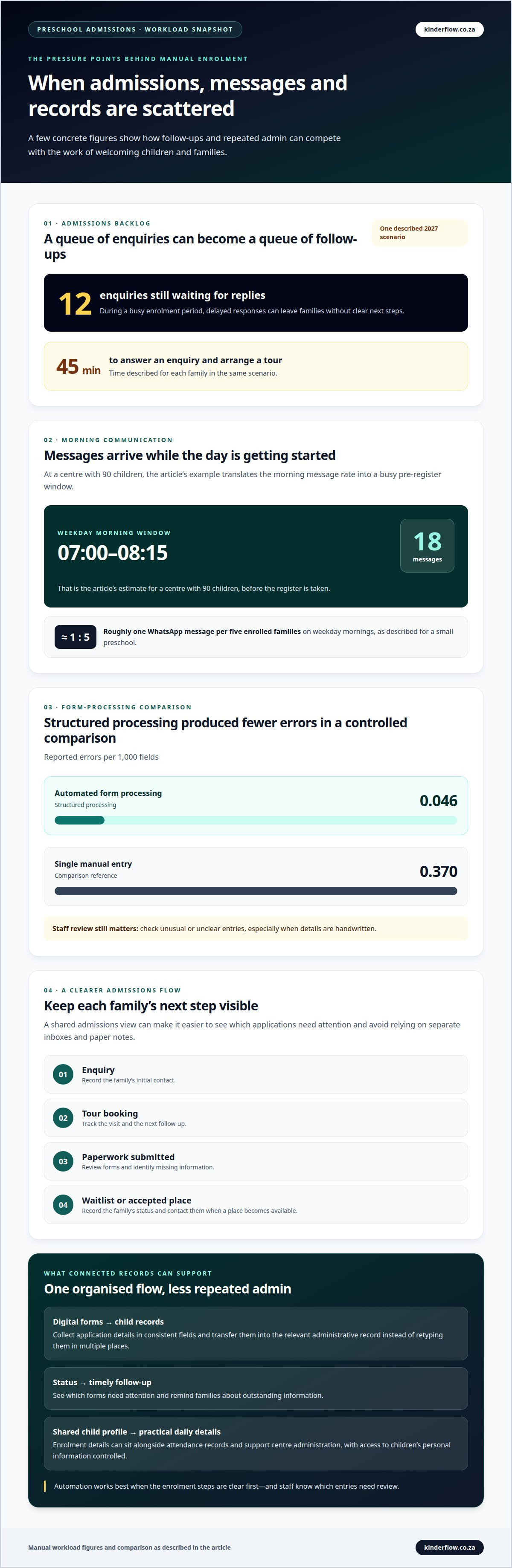
In a controlled comparison, automated form processing produced 0.046 errors per 1,000 fields, compared with 0.370 errors per 1,000 fields for single manual entry. This shows how structured processing can reduce errors in suitable forms. Staff still need to review unusual or unclear entries, especially when information is handwritten.
Reduced Data Entry
Automation can transfer information from a completed form into the relevant administrative record. Staff don’t need to retype the same child’s name, date or contact details in multiple places.
For example, one consistent child record can support enrolment administration, attendance registers and billing. Staff spend less time copying details and more time answering parents’ questions or supporting a child’s routine.
The benefits are greatest when recurring tasks follow a clear process. A centre can define which details to collect, where they belong and who reviews them. Staff then have a shared approach to updating records and communicating with families, rather than relying on individual workarounds.
Choose ECD centre management software when repeated entry across centre administration is taking time away from daily work. The right tools can bring routine records into a more manageable flow.
Problems caused by manual enrolment management
Automated systems can organise applications by stage, from enquiry and tour booking to a completed admission. Staff can place eligible applicants on a waitlist, record their position and contact parents when a place becomes available. A shared view makes follow-ups easier to track than separate inboxes and paper notes.
Manual handling can make busy enrolment periods harder to manage. South African preschools often receive enquiries in July and August. In one described 2027 scenario, twelve enquiries were still waiting for replies, and answering an enquiry while arranging a tour took forty-five minutes per family. Delayed replies can mean missed opportunities and unclear schedules for families.
Morning communication adds another pressure point. A small preschool may receive roughly one WhatsApp message per five enrolled families on weekday mornings. At a centre with ninety children, that can mean eighteen messages before the register is taken, between 07:00 and 08:15. If messages, attendance and application notes sit in separate places, staff must piece together each family’s status.
A clear enrolment funnel shows whether a family has enquired, visited, submitted paperwork, joined a waitlist or accepted a place. For preschools with multiple locations, recording the preferred centre helps staff see where applications belong and manage available places across sites. Connected records also make it easier to spot a follow-up that has been missed.
Learning management systems focus on learning communication, assessment, feedback and progress insights. They support a different part of the preschool journey from admissions, though connected administration can help staff find relevant information. Automation can reduce repeated tracking and make application stages more visible. But unclear steps and scattered records remain problems when automated. Define the process first, then use a system to support it.
Automating preschool enrolment data entry
Automation works well with structured, recurring information such as names, dates, fee amounts and attendance marks. A clear workflow lets a centre collect each detail once and use it in the appropriate administrative process. Staff can spend less time copying information and more time answering family questions.
Start by mapping the current process. Identify which form fields feed each record, who reviews the information and what happens when a field is incomplete. Automation won’t fix scattered or undefined steps. For example, decide how an application moves into enrolment records before setting up automated reminders.
Structured data can also reduce entry errors, but the format matters. In a controlled comparison, automated form processing produced 0.046 errors per 1,000 fields, compared with 0.370 errors per 1,000 fields for single manual entry. The same comparison found automation matched double manual data entry. However, automated processing performed worse when forms contained messy handwriting. Digital fields are therefore better suited to predictable, typed details than unclear handwritten answers.
Keep a human review step for exceptions. Staff can check a blank date, an unusual fee amount or a name that doesn’t match the rest of an application. This protects record quality without requiring repeated manual checks of every routine field. Automate predictable tasks, while keeping unclear information visible for follow-up.
Once the steps are defined, a centre can connect enrolment data with relevant administrative records and reduce duplicate entry. Explore ECD centre management software to see how a connected system can support these processes.
Kinderflow
Kinderflow provides ECD centre management software for preschools, creches and daycares in South Africa. Its platform brings enrolments, attendance, billing and invoicing, learning observations and multi-centre administration together.
Kinderflow can help centres organise admissions and reduce repetitive administration across daily operations. Enrolment information sits alongside attendance and other centre records, helping staff manage routine tasks and make more time for children and families.
For a calmer way to manage centre administration, contact Kinderflow to discuss its ECD centre management software.
Make the next enrolment step feel simpler
A smoother admissions process starts with deciding which part of enrolment needs attention first. It could be keeping applications together, following up with families or reducing repeated data entry. Begin with the task causing the most friction for your team, then build a workflow around how your preschool welcomes families.
Automated preschool enrolments work best when technology supports a thoughtful process, rather than being added to unclear steps. Keep the family experience in view: a clear application journey helps parents understand what happens next, while organised records give staff a reliable way to manage the details.
If you’re ready to explore a more connected approach to preschool administration, contact Kinderflow to discuss enrolments. A considered next step can make room for more of what matters: warm welcomes, attentive care and meaningful time with children.
Frequently Asked Questions
How do I know if my childcare program needs automation?
Consider automation if staff regularly copy the same family details, lose track of follow-ups or reconcile separate records by hand. If an administrator has to search messages to find out which families still need to submit forms, a shared view may help. Identify the recurring task causing the most disruption, then assess whether a clearer workflow would address it.
What does automated preschool enrolment software do?
Automated preschool enrolment software helps a centre move applications through its admissions process. Kinderflow’s enrolment pipeline covers the journey from enquiry to enrolment, with birth-certificate uploads and class placement against live capacity. Staff can see whether a class has room before confirming placement. Collecting an application and making the admissions decision are separate steps: the decision remains with the centre.
Which preschool enrolment platforms are available in South Africa?
South African centres can choose between general form tools, broader school systems and software designed for early childhood development administration. Kinderflow offers an ECD centre management platform for preschools, creches and daycares. When comparing options, focus on whether the features fit your centre’s daily work, such as managing child records, attendance and family communication. The right fit depends on which processes your team needs to bring together.
How secure is online preschool enrolment data and payment processing?
Security depends on how access, records and payments are managed. POPIA treats children’s biographical and medical information as special personal information, so consent and careful access matter. Kinderflow keeps each organisation’s data separate, provides role-based access and audit trails, and never stores parent PINs in plain text. Payment features include EFT and debit-order tools; limit payment access to staff who need it.
How can a preschool implement an automated enrolment system?
Map the current admissions journey, from first enquiry to a confirmed place. Decide what information belongs at each stage and who reviews exceptions. Then set up the digital process, prepare existing records and show staff how to handle incomplete applications. Test the workflow with a defined group of new applications to identify confusing fields or hand-offs before using it for day-to-day admissions.
Frequently asked questions
How do I know if my childcare program needs automation?
Consider automation if staff regularly copy the same family details, lose track of follow-ups or reconcile separate records by hand. If an administrator has to search messages to find out which families still need to submit forms, a shared view may help. Identify the recurring task causing the most disruption, then assess whether a clearer workflow would address it.
What does automated preschool enrolment software do?
Automated preschool enrolment software helps a centre move applications through its admissions process. Kinderflow’s enrolment pipeline covers the journey from enquiry to enrolment, with birth-certificate uploads and class placement against live capacity. Staff can see whether a class has room before confirming placement. Collecting an application and making the admissions decision are separate steps: the decision remains with the centre.
Which preschool enrolment platforms are available in South Africa?
South African centres can choose between general form tools, broader school systems and software designed for early childhood development administration. Kinderflow offers an ECD centre management platform for preschools, creches and daycares. When comparing options, focus on whether the features fit your centre’s daily work, such as managing child records, attendance and family communication. The right fit depends on which processes your team needs to bring together.
How secure is online preschool enrolment data and payment processing?
Security depends on how access, records and payments are managed. POPIA treats children’s biographical and medical information as special personal information, so consent and careful access matter. Kinderflow keeps each organisation’s data separate, provides role-based access and audit trails, and never stores parent PINs in plain text. Payment features include EFT and debit-order tools; limit payment access to staff who need it.
How can a preschool implement an automated enrolment system?
Map the current admissions journey, from first enquiry to a confirmed place. Decide what information belongs at each stage and who reviews exceptions. Then set up the digital process, prepare existing records and show staff how to handle incomplete applications. Test the workflow with a defined group of new applications to identify confusing fields or hand-offs before using it for day-to-day admissions.